
Service Notice: XF305/XF300 Viewfinder Filter
Update
Thank you for using Canon products.
To the Users of the XF305/XF300 Professional Digital Camcorders
To enhance the visibility of the viewfinder on the XF305 and XF300 professional camcorders, the size of the viewfinder and its built-in loupe have been increased. Increasing the size of the viewfinder and loupe, however, has allowed sunlight to easily enter through the viewfinder, causing incident light to converge on the internal display panel inside the camcorder. In rare cases, where sunlight enters continuously for long periods, the LCD display panel may be damaged.
To help prevent damage to the display panel, we have attached a cautionary label to the viewfinder, bundled a viewfinder cap with the product, and included a leaflet to encourage users to attach the viewfinder cap when not using the viewfinder.
We would like to inform our user that to further prevent damage to the display panel due to incident sunlight, we have decided to attach a filter to the viewfinder.
Products
XF305 Professional Digital Camcorder
XF300 Professional Digital Camcorder
Countermeasure
A polarizing filter to absorb external incident light will be added to the viewfinder unit.
After this filter is attached, the image viewed through the viewfinder will appear slightly darker.
User Support
Users with the pre-countermeasure camcorders that are within the scope of support (see “How to Identify Pre-Countermeasure Units” below) should contact a Canon Customer Support Center with the information listed below. After having confirmed the details, we will send the modified viewfinder units to our eligible users free of charge. Users can install the modified viewfinder units by following the instructions at the end of this document.
How to Identify Pre-Countermeasure Units
Camcorders with the following serial numbers are within the scope of support.
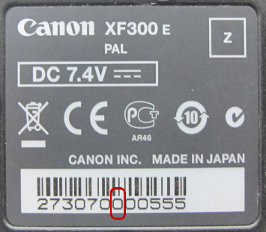
The serial number is indicated on the label on the bottom of the camcorder.
The XF305 and XF300 camcorders whose seventh digit in the serial number is 0, 1, or 2 are within the scope of support.
* * *
* * *
0 *
* * * 
*
* * *
* * *
1 *
* * *
*
* * *
* * *
2 *
* * *
*
How to Remove and Attach the Viewfinder Unit
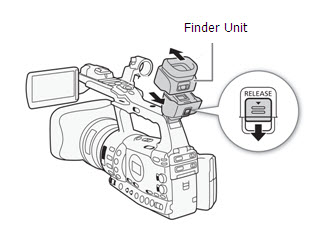
1. Slide the RELEASE switch in the direction of the arrow, and remove the original viewfinder unit by sliding it upward.
2. Attach the modified viewfinder unit by sliding it back onto the camcorder unit until it clicks into place.
Support
This information is for residents of the United States and Puerto Rico only. If you do not reside in the USA or Puerto Rico, please contact the Canon Customer Support Center in your region. Please register your XF305/XF300. By registering, we will be able to notify you via email when future updates become available. If you already registered, please ensure you are opted-in to receive the notification.
Thank you,
Customer Support Operations
Canon U.S.A., Inc
Contact Information for Inquiries
Canon Customer Support Center
Phone: 1-800-OK-CANON
1-800-652-2666
TDD: 1-866-251-3752
Email: carecenter@cits.canon.com
Support options and hours of operation: www.usa.canon.com/support

Thanks for signing up!
The application has encountered an unknown error. Please try again in a few minutes!
By clicking Sign Up, you are opting to receive promotional, educational, e-commerce and product registration emails from Canon USA. You can update your preferences or unsubscribe at anytime.