
If you shoot still images with a modern mirrorless camera, you’re probably aware of different “shutter modes” in your camera’s menu system. But on the surface, there’s little to indicate which may be preferable for different types of photography — or even what their differences are. We’ll try to explain both in the next few minutes.
Before we go any further, we need to clearly state that this applies only to still-image shooting. Video by its very nature uses exclusively Electronic Shutter operation in modern mirrorless cameras, with each frame of video recorded directly off the imaging sensor at whatever FPS frame rate the camera is set for.
One additional, important point: in all Canon EOS cameras with ability to change Shutter Mode (as of mid-2025), any Menu settings we mention here require the camera to be in a Creative Zone shooting mode — P, Tv, Av, M, or FV. If the camera is set to the green “full-auto” mode, an SCN/Special Scene mode, or other automated shooting settings, you won’t find these settings on your camera’s Menu.
Traditional Camera Shutters
A camera’s shutter is a device that can rapidly open, to expose the digital imaging sensor or film, and then close again. In the past, many cameras, including virtually all 35mm film and digital SLR cameras, used some form of “mechanical” shutter mechanism. A modern shutter is shown below:
The actual shutter blades that cover the opening to the image sensor (or film) are highlighted in yellow, in this illustration. Using a series of lightweight, flat metal or composite blades, the shutter can rapidly open, and then close again to cover the image sensor after a shot is taken.
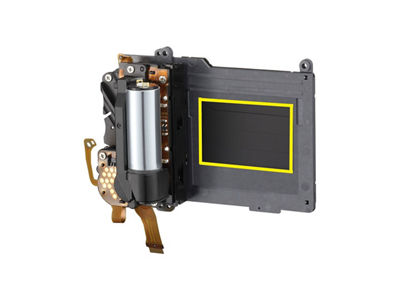
This type of shutter is referred to as a Mechanical shutter, because actual parts physically move for it to operate. Because shutter blades are rapidly moving to expose the image sensor, and then more blades then move to cover the sensor again, there’s also a distinctive “click” sound when mechanical shutters are fired.
Decades ago, 35mm film cameras often used light-tight, flexible cloth or rubber-like materials that ran across the long dimension of the frame, instead of lightweight metal (or similar) blades. These parts got the name “curtains,” and you’ll sometimes hear photographers refer to shutter curtains. That’ll be relevant in a moment, as you’ll see.
Many — but not all — Canon EOS mirrorless cameras offer this now-traditional type of bladed shutter operation. But the important thing here is to just have a picture in your mind of how shutter operation for still images basically occurs.
Three Possible Shutter Modes
Your choice (or the camera’s choice) of Shutter Mode dictates how the image sensor will be opened and capture image data in your camera. Depending on the camera you own, you will typically have two or three possible choices here:
Mechanical Shutter
This is the type of operation just discussed above, using moving, light-tight blades to both block the sensor from light, but then instantly open to expose the sensor to whatever you’re photographing. One set of thin blades quickly covers the sensor and immediately opens, exposing the sensor for the time dictated by the shutter speed you’re using. Then, a second set of blades falls rapidly into place, blocking the sensor again, to end each exposure.
To be clear, for various reasons, some Canon EOS models (like the compact EOS R50 and full-frame EOS R8) do not offer Mechanical Shutter operation, and you won’t find it in their Shutter Modes menu.
1st-curtain Electronic Shutter
Instead of starting the picture-taking process with closed shutter blades which then open to expose the sensor, 1st-curtain Electronic Shutter starts with the sensor completely open, uncovered and exposed — this is how you can view your scene in your viewfinder in the first place. But now, instead of quickly putting a covering set of shutter blades in-place and then immediately re-opening them (as Mechanical Shutter does), the image sensor itself begins to read and record the image data electronically when you fully press the shutter button. Thus, the “first curtain,” or initial action to begin recording the image, is done electronically, using no moving parts.
However, for technical reasons, this Shutter Mode doesn’t allow you to similarly END the exposure by shutting-off the sensor electronically. Instead, a single set of shutter blades, that were retracted and out of the way, now physically move to cover the opening to the sensor. So in effect, 1st-curtain Electronic Shutter is a semi-electronic method of shutter operation — Electronic operation to “open” the shutter, and mechanical or physical shutter blades to close and end the exposure.
Electronic Shutter
Sometimes casually referred to as “full Electronic Shutter,” this method by-passes any mechanical or moving parts. The image sensor begins completely uncovered, its surface exposed as you view and compose your scene. When the shutter button is fully pressed, the sensor changes operation, and again electronically begins to capture brightness data from each pixel on the image sensor, rapidly “scanning” the sensor’s surface. Once completed, the sensor now electronically stops the recording function, and resumes ordinary viewing from the sensor’s pixels.
Because there are no moving parts with Electronic Shutter, it’s possible to take still images in total silence. Most Canon EOS mirrorless cameras do two things during Electronic Shutter operation, since by itself it’s completely silent.
A white outline, or border, briefly appears in both the viewfinder and camera’s LCD screen each time Electronic Shutter fires, as confirmation to the photographer that a picture has been taken.
Many recent EOS R-series models offer a “volume” Menu setting (usually in the yellow-colored Set-up Menu area) to permit a synthetic shutter sound, to give you (and even your subjects) the ability to hear a traditional click for each image you take.
With Electronic Shutter, to give confirmation that a still image has actually been taken, each time the shutter button is fully pressed, a white outline (simulated in this image) flashes once, very briefly for each image. Whenever you see this outline in your finder or LCD screen, you’ve taken a still picture.

Factors to Consider When Picking a Shutter Mode
The two (or three, depending on your camera model) available Shutter Modes each have distinct benefits or limitations in specific situations. Some of the major ones to consider are:
Available shutter speeds
For technical reasons, some EOS models offer even faster maximum shutter speeds with Electronic Shutter operation — such as 1/32,000th second on the EOS R5 Mark II camera, vs. the normal max. speed of 1/8000th second in other shutter modes.
Similarly, in some models, the slowest shutter speed may be curtailed with Electronic Shutter. While all EOS R-series mirrorless models allow slow speeds down to 30 full seconds, in some models, the slowest Electronic Shutter speed available may be closer to one second.
Even faster maximum shutter speeds can be possible with Electronic Shutter in some cameras, vs. the fastest available speeds with 1st-curtain Electronic or Mechanical Shutter operation.
Drive speeds (continuous shooting rates)
Since there are no moving parts, Electronic Shutter often provides a possible benefit here. While the fastest frames per second rate with Mechanical or 1st-curtain Electronic Shutter is sometimes less than 10 FPS, the same camera with Electronic Shutter active may be able to shoot (full-resolution) still-images at 20, 30 or even 40 frames per second.
Flash operation
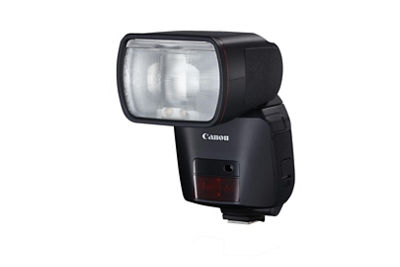
Again, for technical reasons, most EOS models cannot shoot any form of electronic flash (even with dedicated Canon speedlites) with Electronic Shutter. 1st-curtain Electronic and especially Mechanical Shutter modes do work well with flash. The very fast image sensor read-out speeds of cameras such as the EOS R1 and EOS R5 Mark II, from their so-called stacked image sensors, do permit flash with Electronic Shutter, albeit with slightly slower maximum flash sync shutter speeds.
Even faster maximum shutter speeds can be possible with Electronic Shutter in some cameras, vs. the fastest available speeds with 1st-curtain Electronic or Mechanical Shutter operation.
Vibration or “shutter shock”
Mechanical Shutter operation can introduce some unwanted vibration as the opening set of shutter blades fully open. This varies depending upon the camera, but in some models (especially at slower shutter speeds), it can be enough to produce slight image softness or blur from camera vibration — even if the camera is tripod-mounted. 1st-curtain Electronic and especially Electronic Shutter operation can offer a distinct advantage here, especially when photographers are using modest shutter speeds.
Rolling shutter distortion
Even though Electronic Shutter seems to have some big advantages for action shooting, sports and so on, there can be one important limitation: the potential for what’s called rolling shutter distortion. When this occurs, any fast-moving subject in the scene — even if captured at a fast shutter speed like 1/2000th or 1/4000th of a second — can have an unusual skewed, bent or distorted appearance.
This is one example of rolling shutter distortion, when Electronic Shutter was used. The fast-moving volleyball — which we know is perfectly round in shape — appears more like a football or rugby ball, its shape distorted. Modern mirrorless models with fast image sensor read-out speeds (or “stacked” sensors) can minimize this, but this is often exclusive to high-end models. With Mechanical or 1st-curtain Electronic Shutter, this effectively becomes a non-factor.

Artificial light — especially LED and fluorescent light sources
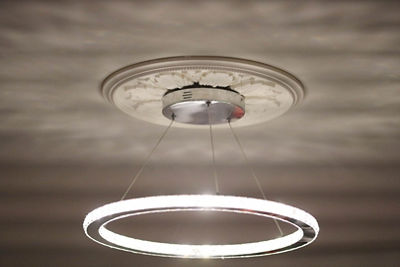
Another Electronic Shutter characteristic is possible “banding,” flickering, or uneven exposures of subjects that are lit by modern LED lighting, or conventional fluorescent indoor lights. This is very dependent upon the actual light fixtures in use, so it can be hard to generalize about this, unless test shots are taken in that specific environment ahead of time. Again, higher-end models like the EOS R5 Mark II, with faster image sensor read-out speeds, can minimize this or in some cases, eliminate it. This isn’t a problem with Mechanical Shutter, and in most cases, 1st-curtain Electronic Shutter likewise minimizes or eliminates the possible problem.
The bottom half of this frame, lit by a household LED fixture, shows an extreme case of banding, with the darker horizontal lines that run across the image. This can be especially prevalent if faster shutter speeds are used, with light sources that actually flicker as they illuminate. This won’t happen with continuous, non-flickering light sources, such as sunlight, or traditional tungsten-type household bulbs (which are becoming less and less common nowadays).
Uneven out-of-focus highlights, or “bokeh”
With 1st-curtain Electronic Shutter, this can occasionally crop up in shots taken at very wide lens apertures, using fast shutter speeds in daylight. Portrait photographers looking for that maximum out-of-focus background look can sometimes find that the expected round, out-of-focus background highlights can appear to be softly cut-off at the bottom half each out-of-focus highlight. Switching to either Mechanical or Electronic Shutter operation will eliminate this (admittedly rare) phenomenon from occurring.
So, Which Shutter Mode is Best, and When?
Any answers here must be general in nature, and photographers are free to work with any Shutter Mode in their cameras that they feel comfortable with — or, comfortable experimenting with. But here are a few possible starting points:
Landscape or Scenic Images
Electronic Shutter. There’s essentially no risk of banding from artificial light, likely no distortion of fast-moving subjects, and you gain the benefit of no added “shutter shock” or vibration — whether or not you’re using a tripod.

Scenic or Cityscape Images, and Street Photography with Artificial Lights Visible
Mechanical Shutter, or 1st-curtain Electronic Shutter. None of the possible risks of banding or uneven exposure in any parts of the scene illuminated with artificial lights.

Portraits — Outdoors, or with Flash
Mechanical Shutter. No risk of strange out-of-focus highlights in backgrounds at wide lens apertures and fast shutter speeds; the sound of the shutter firing can be helpful for some subjects; and no unexpected limitations if you do use flash. Obviously, cameras that don’t offer Mechanical Shutter operation will have to fall-back on 1st-curtain Electronic, or Electronic Shutter. For users working with very wide-aperture lenses, in bright sunlight, the possible availability of even faster top shutter speeds (to blur out-of-focus backgrounds) can make Electronic Shutter a good second option.

Flash Images
1st-curtain Electronic Shutter, or Mechanical Shutter. Mechanical Shutter can be especially effective when working with 3rd-party, non-dedicated studio flashes.

Sports and Action (Birds-in-Flight, etc.)
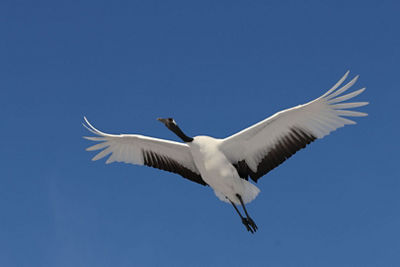
1st-curtain Electronic Shutter, or Mechanical Shutter. There’s minimal risk of distortion of fast-moving subjects, or parts of subjects (a classic example are the ends of the wings of flying birds, which can sometimes seem weirdly shaped when photographed at fast shutter speeds with Electronic Shutter on some cameras.) Admittedly, there are possible benefits to full Electronic Shutter here, such as potentially faster FPS shooting speeds, and silent shooting for events like golf, or where you don’t want to disturb wildlife. Experience with your camera is invaluable here, so you know how likely possible Electronic Shutter problems may be in different situations.

Indoor Shots with Available Light
Mechanical or 1st-curtain Electronic Shutter. Both essentially remove the risk of unexpected banding from flickering artificial light sources. If other priorities, such as need for silent shooting, are a greater priority, take a few test shots under this indoor lighting at shutter speeds you expect to use, and see if you notice any uneven exposure or banding problems with a careful look at playback images on your LCD screen. Faster shutter speeds make the problem (with Electronic Shutter) more likely, so if you can safely drop your shutter speeds to something like 1/60th second, you’re less likely to have a problem here.

Whenever Quiet or Silent Shooting is Needed
Electronic Shutter. In cameras so-equipped, adjust the “Volume” menu setting to either totally remove any audible sound, or to have it at a level that’s comfortable for you and your surroundings. Just be sure you don’t run into possible problems with uneven exposure or banding from LED or other flickering light sources; if you do, 1st-curtain Electronic Shutter is the next-quietest shutter option.

What About Silent Shutter Function (on some EOS Models)?
This can seem confusing, because it appears as an additional Menu item along with Shutter Mode in the red Shooting Menu of some Canon EOS models. This separate Silent Shutter function overrides your choice of shutter mode, doing the following:
Switches the camera to Electronic Shutter operation, with any available Volume set to “zero”
Simultaneously turns off other sound sources, especially confirmation beep tones for things like One-shot AF confirmation, self-timer countdown, and so on
All continuous Drive speed settings, AF operation settings, and so on remain selectable in your camera’s Menus
Summary
Choosing a shutter mode is another benefit in modern interchangeable lens mirrorless cameras. While this is often something users won’t need to constantly change or adjust — the default setting on most EOS R-series cameras is 1st-curtain Electronic Shutter, which is a versatile setting — once you understand the potential benefits of Electronic Shutter, and (if it’s available on your camera) Mechanical Shutter, you can optimize your still-image shooting for the type of scene and situation you’re photographing. No one Shutter Mode is always best, so getting comfortable with your options is a great step forward in being in full control of your camera, and its images.

Thanks for signing up!
The application has encountered an unknown error. Please try again in a few minutes!
By clicking Sign Up, you are opting to receive promotional, educational, e-commerce and product registration emails from Canon USA. You can update your preferences or unsubscribe at anytime.