
Feature Notice: Possible Inaccurate Detection of the One-Touch Panel Open/Close Signal for the imageCLASS MF5960dn/MF5950dw/D1370/D1350
Update
We greatly appreciate your patronage of Canon products. We have become aware of a rare circumstance where a fax could be misdirected when the One-Touch Panel is used on the imageCLASS MF5960dn, imageCLASS MF5950dw, imageCLASS D1370, and imageCLASS D1350 products. This can occur when the Open/Close signal of the One-Touch panel is not accurately detected and therefore a fax may be sent to a different address than was intended. We offer our sincerest apologies to customers who may have been inconvenienced by this issue. Canon's quality management team has developed a firmware fix to ensure that all affected customers can continue using these products with confidence.
Phenomenon
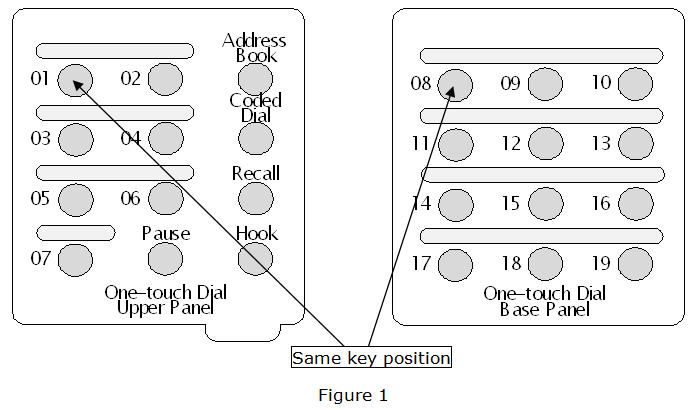
When a One—Touch dial key is used to select the addressee, there is a slight possibility that a different addressee than the intended one could be selected. If the Start button is pushed without confirming the recipient visually on the control panel, the fax can be sent to an unintended addressee. This can occur when the Open/Close signal of the One-Touch panel is not accurately detected. For instance, if One-Touch dial key 01 is pushed, One-Touch dial key 08 (located in the same position as key 01 when One-Touch panel is opened) may be selected inadvertently as shown below in Figure 1.
Products
Affected Models
- imageCLASS MF5960dn
- imageCLASS MF5950dw
- imageCLASS D1370
- imageCLASS D1350
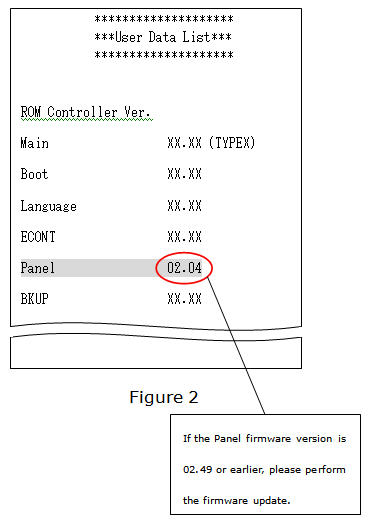
If you have one of the above listed models and the Panel firmware version on your machine is 02.49 or earlier, then your imageCLASS device may possibly be affected by this issue. Please confirm your Panel firmware version using the following procedure.
Procedure
Procedure to Verify Firmware Version on your Canon imageCLASS Product
- Push the [Report] button on the control panel.
- Select "Print Reports" and push [OK].
- Select "User Data List" and push [OK].
- Push [OK].
- Select "Yes" with left arrow key and push [OK].
Confirm the version of Panel firmware on the User Data List visually. If the Panel firmware version is 02.49 or earlier, please perform the firmware update. (Figure 2 below shows a version that requires the firmware update.) If the Panel version is 02.50 or later, there is no need to perform the firmware update, since the update has already been applied.
Countermeasure
The above phenomenon is eliminated by updating the firmware on your imageCLASSMF5960dn/MF5950dw/D1370/D1350 product. If the Panel firmware version is 02.49 or earlier, it is essential that you download the latest firmware for your imageCLASS model from the Canon USA website. To download the latest firmware, please use the links provided below for your specific imageCLASS model, then choose your Operating System and look in the > Firmware section.
If you need further assistance or have any questions, please contact the Canon USA Support Center at 1-800-OK-CANON (1-800-652-2666).

Thanks for signing up!
The application has encountered an unknown error. Please try again in a few minutes!
By clicking Sign Up, you are opting to receive promotional, educational, e-commerce and product registration emails from Canon USA. You can update your preferences or unsubscribe at anytime.