
Service Notice: WUX10 Mark II, WUX4000, WUX5000 LCOS Projectors
Phenomenon
Thank you for using Canon products.
The following phenomena have been confirmed on some Canon WUX10 Mark II/WUX4000/WUX5000 projectors.
WUX10 Mark II Projector
When using the projector together with a third-party control device, depending on the timing of the communication between the control device and the projector, the projector may exhibit the following phenomena.
- The lamp does not turn on even if the POWER button is operated.
- The input image signal cannot be detected and the image cannot be projected.
- The projected image is abnormal in color.
WUX4000/WUX5000 Projectors
When using the projector together with a third-party control device, depending on the timing of the communication between the control device and the projector, in rare instances, the projector may suddenly stop operating. In such case, the projector operations can be recovered by disconnecting and reconnecting the power plug.
If your Canon WUX10 Mark II, WUX4000 or WUX5000 projector meets the criteria listed in the table below, it may be affected by the phenomena described above. If so, please contact us using the contact information listed at the bottom of this page and we will update the firmware of the projector to address these phenomena.
We sincerely apologize for any inconvenience caused to customers who use these products. We would therefore like to thank our customers for their understanding in this matter.
Products
The models with the firmware version listed below may be affected by the phenomena listed above and are eligible for the firmware update.
| Model Name | Firmware Version |
|---|---|
| WUX10 Mark II | 01.000002 01.010003 01.010103 01.020203 01.040303 |
| WUX4000 | 01.010101 01.020302 |
| WUX5000 | 01.000000 |
When the network function is disabled, last two digit of Firmware Version is “- -“.
How to Identify Affected Products:
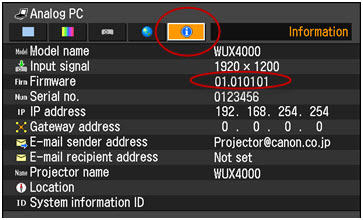
You can check the firmware version with the procedure below. The example below is from the WUX4000 menu. Please use the same procedure for the other affected projector models.
Procedure
Make a projection and display the menu.
- Press the MENU button on the projector or on the remote controller to open the menu screen.
- Use the right cross-directional key (►) to move to the Information tab.
- Check the firmware version in the Firmware field. (The following menu is displayed when the Network function is set to “on”.)
Support
The products with this phenomenon will be inspected and repaired free of charge. If you own one of the affected products, please contact our Customer Support Center. This information is for residents of the United States and Puerto Rico only. If you do not reside in the USA or Puerto Rico, please contact the Canon Customer Support Center in your region.
Thank you,
Customer Support Operations
Canon U.S.A., Inc
Contact Information for Inquiries
Canon Customer Support Center
Phone: 1-800-OK-CANON
1-800-652-2666
TDD: 1-866-251-3752
Email: carecenter@cits.canon.com
Support options and hours of operation: www.usa.canon.com/support

Thanks for signing up!
The application has encountered an unknown error. Please try again in a few minutes!
By clicking Sign Up, you are opting to receive promotional, educational, e-commerce and product registration emails from Canon USA. You can update your preferences or unsubscribe at anytime.