
Canon Support for EOS C50 | Canon U.S.A., Inc.
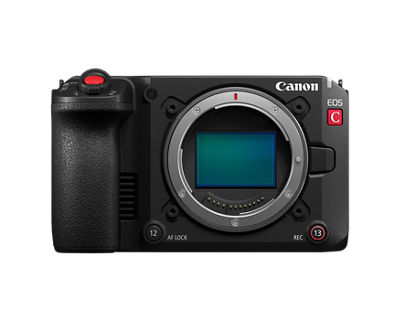
EOS C50
Get started with these quick links.





DOWNLOADS

Locating and installing your download
 | Chrome |
- A grey bar will appear at the bottom of your browser window which will contain your download. To install your download click on the name of the downloaded file. Alternatively you can click 'Show all downloads...' to view the list of all recently downloaded files

- If the grey bar is not visible you can also access the list of recently downloaded files by clicking the 3 small horizontal lines
 located on the right of the address bar
 - Select 'Downloads' from the menu and the list of recently downloaded files will open
- From this list you can also install the download by clicking on the file name
- To open the folder on your computer that contains your downloaded files please select the 'Open downloads folder' link on the right of the page
- The folder that contains your download will now be open
 | Safari |
- Mac Users - Click the down arrow
 in the top right of the browser
 - Windows Users - Click the gear wheel
 in the top right of the browser
 - Click the small image of the magnifying glass
 next to your download
 - The folder that contains your download will now be opened
 | Firefox |
- Click the down arrow in the top right of the browser
- Windows Users - Click the small image of the folder
 next to your download
 - Mac Users - Click the small image of the magnifying glass next to your download
- The folder that contains your download will now be opened
 | Internet Explorer |
- Click the gear wheel in the top right of the browser
- Select 'View Download' from the menu
- Select 'Location' next to your download
- The folder that contains your download will now be opened
 | Microsoft Edge |
- Click the three dots icon in the top right of the browser
- Select 'Downloads' from the menu
- Select 'Open folder' next to your download
- The folder that contains your download will now be opened
There are no copying instructions for this browser
- Windows 11
- Windows 10 (x64)
- Windows 10
- Windows 8.1 (x64)
- Windows 8.1
- Windows 8 (x64)
- Windows 8
- Windows 7 (x64)
- Windows 7
- Windows Vista (x64)
- Windows Vista
- Windows Me
- Windows XP (x64)
- Windows XP
- Windows 98
- Windows 95
- Windows Server 2022
- Windows Server 2019 (x64)
- Windows Server 2016 (x64)
- Windows Server 2012 R2 (x64)
- Windows Server 2012 (x64)
- Windows Server 2008 R2 (x64)
- Windows Server 2008 (x64)
- Windows Server 2008
- Windows Server 2003 R2 (x64)
- Windows Server 2003 (x64)
- Windows Server 2003 R2
- Windows Server 2003
- macOS Golden Gate v27
- macOS Tahoe v26
- macOS Sequoia v15
- macOS Sonoma v14
- macOS Ventura v13
- macOS Monterey v12
- macOS Big Sur v11.0
- macOS Catalina v10.15
- macOS Mojave v10.14
- macOS High Sierra v10.13
- macOS Sierra v10.12
- OS X El Capitan v10.11
- OS X Yosemite v10.10
- OS X Mavericks v10.9
- OS X Mountain Lion v10.8
- OS X Lion v10.7
- Mac OS X Snow Leopard v10.6
- Mac OS X v10.1
- Mac OS 9
- Linux ARM
- Linux MIPS
- Linux 64bit
- Linux 32bit
- SAP
- Windows Server 2025
- Windows NT
- Linux
Locating and installing your download
| Chrome |
- A grey bar will appear at the bottom of your browser window which will contain your download. To install your download click on the name of the downloaded file. Alternatively you can click 'Show all downloads...' to view the list of all recently downloaded files
- If the grey bar is not visible you can also access the list of recently downloaded files by clicking the 3 small horizontal lines located on the right of the address bar
- Select 'Downloads' from the menu and the list of recently downloaded files will open
- From this list you can also install the download by clicking on the file name
- To open the folder on your computer that contains your downloaded files please select the 'Open downloads folder' link on the right of the page
- The folder that contains your download will now be open
| Safari |
- Mac Users - Click the down arrow in the top right of the browser
- Windows Users - Click the gear wheel in the top right of the browser
- Click the small image of the magnifying glass next to your download
- The folder that contains your download will now be opened
| Firefox |
- Click the down arrow in the top right of the browser
- Windows Users - Click the small image of the folder next to your download
- Mac Users - Click the small image of the magnifying glass next to your download
- The folder that contains your download will now be opened
| Internet Explorer |
- Click the gear wheel in the top right of the browser
- Select 'View Download' from the menu
- Select 'Location' next to your download
- The folder that contains your download will now be opened
| Microsoft Edge |
- Click the three dots icon in the top right of the browser
- Select 'Downloads' from the menu
- Select 'Open folder' next to your download
- The folder that contains your download will now be opened
There are no copying instructions for this browser
Camera Connect
Digital Photo Professional Express

image.canon
SETUP & TROUBLESHOOTING
Find answers in our extensive knowledge base with dozens of articles and curated Q&As to help you troubleshoot your issue yourself.
SELECT ERROR CODE
Don’t see your error code? Let us know as we are capturing feedback for research purposes.
PRODUCT INFO
| Tech. Specs. Detailed PDF | View Full Details of Technical Specifications |
Type
| Image Processor | DIGIC DV 7 |
| Lens Mount | Canon RF mount |
| Lens | RF lensincluding RF-S lens, RF cinema lens) EF lensincluding EF-S lens, EF cinema lens (when equipped the EF-RF Mount Adapter)) PL lenswhen equipped the Mount Adapter PL-RF) |
Image Sensor
| Sensor | Full frame CMOS sensor |
| Number of Total Pixels | Approx. 34.20 megapixels (7144x4790) |
| Number of Effective Pixels | Sensor mode: Full frame 3:2 Approx. 32.373 megapixels (6968x4646): 6960x4640 / 6912x4608 resolution Sensor mode: Full frame Approx. 25.628 megapixels (6968x3678): 6960x3672 /4096x2160 / 2048x1080 resolution Approx. 24.032 megapixels (6534*1x3678): 3840x2160 / 1920x1080 resolution Sensor mode: Super 35mm (Crop) Approx. 13.427 megapixels (5044x2662): 5036x2656 /4096x2160 /2048x1080 resolution Approx. 12.591 megapixels (4730*2x2662): 3840x2160 / 1920x1080 resolution Sensor mode: Super 16mm (Crop) Approx. 3.388 megapixels (2532x1338): 2524x1332 /2048x1080 resolution Approx. 3.176 megapixels (2374*3x1338): 1920x1080 resolution *1 Converted from 6968 pixels *2 Converted from 5044 pixels *3 Converted from 2532 pixels |
| Unit pixel | 5.16 5.16 (m) |
| Effective Sensor Size | Sensor mode: Full frame 3:2 35.9 x 23.9 mm 43.2 mm on the diagonal)6960x4640 resolution 35.7 x 23.8 mm 42.9 mm on the diagonal)6912x4608 resolution Sensor mode: Full frame 35.9 x 18.9 mm 40.6 mm on the diagonal)6960x3672 /4096x2160 / 2048x1080 resolution 33.6 x 18.9 mm (38.6 mm on the diagonal)3840x2160 / 1920x1080 resolution Sensor mode: Super 35mm (Crop) 26.0 x 13.7 mm (29.4 mm on the diagonal)5036x2656 /4096x2160 /2048x1080 resolution 24.4 x 13.7 mm (28.0 mm on the diagonal)3840x2160 / 1920x1080 resolution Sensor mode: Super 16mm (Crop) 13.0 x 6.9 mm (14.7 mm on the diagonal)2524x1332 /2048x1080 resolution 12.2 x 6.9 mm (14.0 mm on the diagonal)1920x1080 resolution |
| Color Filter System | RGB primary color filter (Bayer array) |
| Dynamic Range | Sensor mode: Full frame Canon Log 21600% / 15+ stopsBase Sensitivity ISO 800 Sensor mode: Super35mm Canon Log 21600% / 16 stopsBase Sensitivity ISO 800 |
LCD Screen
| Type | Color wide LCD monitor | ||||||||||||||||||||||||||||||||||||||||||||||||||||||||||||||||||||||||||||||||||||||||||||||||||||||||||||||||||||
| Screen size | 3.0 inch (diagonal 7.5 cm) | ||||||||||||||||||||||||||||||||||||||||||||||||||||||||||||||||||||||||||||||||||||||||||||||||||||||||||||||||||||
| Number of dots | Approx. 1.62 million dots (900xRGBx600) | ||||||||||||||||||||||||||||||||||||||||||||||||||||||||||||||||||||||||||||||||||||||||||||||||||||||||||||||||||||
| Field of view coverage | 100% | ||||||||||||||||||||||||||||||||||||||||||||||||||||||||||||||||||||||||||||||||||||||||||||||||||||||||||||||||||||
| Adjustment function | Brightness, Contrast, Color, Sharpness, Luminance* * A luminance boost function is also available that makes LCD monitor display easier tosee outdoors and in other bright conditions. |
||||||||||||||||||||||||||||||||||||||||||||||||||||||||||||||||||||||||||||||||||||||||||||||||||||||||||||||||||||
| Touch panel | Electrostatic capacitance system. Touch/drag operation supported. | ||||||||||||||||||||||||||||||||||||||||||||||||||||||||||||||||||||||||||||||||||||||||||||||||||||||||||||||||||||
| Network Specifications | Ethernet - Standards compliance: Follows the specifications of the Ethernet adapter Wi-Fi - Supported standards: IEEE802.11b /g /n2.4 GHz IEEE802.11a / n / ac5 GHz - Setup: InfrastructureWPS: push button method, WPS: PIN code method, access point, manual configurationCamera access point - Security: Open, Shared key, WPA/WPA2/WPA3-Personal, WPA/WPA2/WPA3-Enterprise - Encryption TKIPAES IP streaming |
||||||||||||||||||||||||||||||||||||||||||||||||||||||||||||||||||||||||||||||||||||||||||||||||||||||||||||||||||||
| Compression method | MPEG-4 H.264/AVC | ||||||||||||||||||||||||||||||||||||||||||||||||||||||||||||||||||||||||||||||||||||||||||||||||||||||||||||||||||||
| Bit rate/Resolution | 9 Mbps1920x108059.94P59.94i50.00P50.00i 4 Mbpssame as above |
||||||||||||||||||||||||||||||||||||||||||||||||||||||||||||||||||||||||||||||||||||||||||||||||||||||||||||||||||||
| Audio | MPEG-2 ACC-LC 2ch | ||||||||||||||||||||||||||||||||||||||||||||||||||||||||||||||||||||||||||||||||||||||||||||||||||||||||||||||||||||
| Audio rate | 256 kbps | ||||||||||||||||||||||||||||||||||||||||||||||||||||||||||||||||||||||||||||||||||||||||||||||||||||||||||||||||||||
| Protocols | UDP Prioritizes transfer speed, with no guarantees of reliability or correct order. Lost or lagging packets ignored. RTP Standard system for sending videos and audio online. Lost or lagging packets ignored. SRT Achieves high-quality streaming with minimal video distortion due to low latency and a packet loss playback function. RTP+FEC Error correction (FEC)* control during RTP transfer enables recovery of lost or corrupt packets on the receiving side. RTSP+RTP Real-time data streaming control via RTSP (Real Time Streaming Protocol) andtransfer via RTP. The receiving side can start or stop streaming. |
||||||||||||||||||||||||||||||||||||||||||||||||||||||||||||||||||||||||||||||||||||||||||||||||||||||||||||||||||||
| Network functions and connection methods |
|
||||||||||||||||||||||||||||||||||||||||||||||||||||||||||||||||||||||||||||||||||||||||||||||||||||||||||||||||||||
Input / Output terminal
| Input terminal | Camera
|
||||||||||||||||||||||||||||||||||||||||||||||||||||||||||||||||||||||||||||||||||||||||||||||||||||||||||||||||||||||||||||||||||||||||||||||||||||||||||||||||||||||||||||||||||||||||||||||||||||||||||||||||||||||||||||||||||||||||||||||||||||||||||||||||||||||||||||||||||||||||
| Output terminal |
|
||||||||||||||||||||||||||||||||||||||||||||||||||||||||||||||||||||||||||||||||||||||||||||||||||||||||||||||||||||||||||||||||||||||||||||||||||||||||||||||||||||||||||||||||||||||||||||||||||||||||||||||||||||||||||||||||||||||||||||||||||||||||||||||||||||||||||||||||||||||||
| Input / Output terminal |
|
||||||||||||||||||||||||||||||||||||||||||||||||||||||||||||||||||||||||||||||||||||||||||||||||||||||||||||||||||||||||||||||||||||||||||||||||||||||||||||||||||||||||||||||||||||||||||||||||||||||||||||||||||||||||||||||||||||||||||||||||||||||||||||||||||||||||||||||||||||||||
Other Terminals
| Multi-Accessory Shoe Terminal | Canon original specifications |
Power Source
| Terminal | Battery terminal: DC 7.2 V (battery pack | ||||||||||||||||||||||||||||||||||||||||||||||||||||||||||||
| Compatible battery | LP-E6Pprovided with camera/LP-E6NH* *Lenses that do not operate when powered by LP-E6NH or DR-E6C only in VIDEO mode
|
Dimensions and Weight
| Dimensions (W x H x D) | Camera (Width x height x depth) Approx. 142 x 88 x 95 mm (5.6 x 3.5 x 3.7 in.) (camera body only) Approx. 222 x 239 x 186 mm (8.7 x 9.4 x 7.3 in.) (attached handle unit and Microphone holder) * For dimension details, refer to the six-sided view. |
| Weight | (1) Camera Approx. 670 g (1.47 lb.) (2) Camera+Battery Pack LP-E6P+CFexpresscard+SD card Approx. 765g (1.7 lb.) (3) Camera+Handle unit+Microphone holder+Battery Pack LP-E6P+CFexpresscard+SD card Approx. 1120 g (2.5 lb.) (4) Supplied accessories Handle unit: Approx. 300 g (10.6 oz.) Microphone holder and two bolts: Approx. 60 g (2.1 oz.) LP-E6P Battery Pack: Approx. 82 g (2.89 oz.) LC-E6 Battery Charger: Approx. 110 g (3.9 oz.) LC-E6E Battery Charger: Approx. 100 g (3.5 oz.) (excluding power cord) |
Operating Environment
| Temperature and humidity requirements for performance | Approx. 0 to 40°C (32 to 104 ), 85% (relative humidity) |
| Temperature and humidity requirements for operation | Approx. -5 to 45°C (23 to 113 ), 60% (relative humidity) |
Video
| Sensor Mode |
|
||||||||||||||||||||||||||||||||||||||||||||||||||||||||||||||||||||||||||||||||||
| Base ISO |
|
||||||||||||||||||||||||||||||||||||||||||||||||||||||||||||||||||||||||||||||||||
| Media Overview |
|
||||||||||||||||||||||||||||||||||||||||||||||||||||||||||||||||||||||||||||||||||
| Available Combinations for Second Card Recording |
Simultaneous recording is available only with normal recording while connected to a network with IP streaming activated. *1 Only when the main recording format is RAW. *2 Not available when recording in RAW format. *3 Not available when recording in XF-AVC format. |
||||||||||||||||||||||||||||||||||||||||||||||||||||||||||||||||||||||||||||||||||
| Slow & Fast Motion Recording |
*1 Maximum frame rate varies by sensor mode. Full Frame 3:2: up to 30P Full Frame: up to 180P Super 35mm (Cropped): up to 60P Super 16mm (Cropped): up to 150P *2 Only in Super 16mm (Cropped) sensor mode. |
||||||||||||||||||||||||||||||||||||||||||||||||||||||||||||||||||||||||||||||||||
Available Shooting Frame Rates
| Configurable frame rate (RAW) |
|
|||||||||||||||||||||||||||||||||||||||||||||||||||||||||||||||||||||||
| Configurable frame rate (XF-AVC) |
*1 Up to 60P when the sensor mode is [Super 35mm (Cropped)] *2 Up to 150P when the sensor mode is [Super 16mm (Cropped)] |
|||||||||||||||||||||||||||||||||||||||||||||||||||||||||||||||||||||||
| Configurable frame rate (XF-HEVC S) Recording media: CFexpress card |
*1 Up to 60P when the sensor mode is [Super 35mm (Cropped)]. *2 Up to 150P when the sensor mode is [Super 16mm (Cropped)]. |
|||||||||||||||||||||||||||||||||||||||||||||||||||||||||||||||||||||||
| Configurable frame rate (XF-AVC S) Recording media: CFexpress card |
*1 Up to 60P when the sensor mode is [Super 35mm (Cropped)]. *2 Up to 150P when the sensor mode is [Super 16mm (Cropped)]. |
|||||||||||||||||||||||||||||||||||||||||||||||||||||||||||||||||||||||
Crop Recording
| Available configurations |
|
||||||||||||||||||||||||||||||||||||||||||||||||||||||||||||||||||||||||||||||||||||||||||||||||||||||||||||||||||||||||||||||||||||||||||||||||||||||||||||||||||||||||||||||||||||||||||||||||||||||||||||||||||||||||||||||||||||||||||||||||||||||||||||||||||||||||||||||||||||||||||||||||||||||||
| Available values |
Cropped recording is not available in these situations. - Full Frame 3:2 or Super 16mm (Cropped) sensor mode - Slow & Fast Motion, Frame Recording, or Interval Recording recording mode Anamorphic desqueeze is not available for clips recorded cropped. Cropped video output to an external monitor during recording is not supported. |
||||||||||||||||||||||||||||||||||||||||||||||||||||||||||||||||||||||||||||||||||||||||||||||||||||||||||||||||||||||||||||||||||||||||||||||||||||||||||||||||||||||||||||||||||||||||||||||||||||||||||||||||||||||||||||||||||||||||||||||||||||||||||||||||||||||||||||||||||||||||||||||||||||||||
Auto Focus
| Auto Focus | Subject detection (Subject to Detect, Subject Detection AF*, Eye Detection, Face Detection AE, and Tracking) is available in Slow & Fast Motion recording at frame rates of 24P or higher. At frame rates in a range of 1P150P, other AF-relatedfunctions are also available. * At frame rates of 150P or lower. |
| Focusing systems | Dual Pixel CMOS AF(CMOS AF) CMOS AF detection range When detecting the entire area and subject, approx. 100% (Vertical) x approx. 100% (Horizontal). Otherwise approx. 100% (Vertical) x approx. 90% (Horizontal) May be approx. 100 (Vertical) x approx. 80% (Horizontal), approx. 75% (Vertical) x approx. 40% (Horizontal) depending on the lens |
| AF Modes | Applies when the AF/MF switch of an RF lens is set to AF. Continuous AF Used to keep continuously focused on a subject. One-Shot AF AF is performed only while the assignable button assigned to One-Shot AF is pressed. No further lens movement is permitted after focusing. Releasing the assignable button resumes continuous AF if it is enabled. When [Lens action if cannot AF] is set to [Stop] in Continuous AF mode, stop the search when distance measurement is not possible. |
| AF Area | Small Zone: Video display range approx. 14.7Verticalx12.2Horizontal Flexible Zone 1Video display range approx. 38Verticalx 26Horizontal Flexible Zone 2Video display range approx. 85Verticalx 26Horizontal Flexible Zone 3Video display range approx. 38Verticalx 77 (Horizontal Full: approx. 100% (Vertical) x approx. 100% (Horizontal) The area frame can be moved,* and thickness is adjustable. * Only with options other than [Whole Area] and when digital zoom is off. Area frame resizing is available for Flexible Zone options 13. Values above are based on these conditions: [Sensor Mode]: [Full Frame]; [Main Resolution]: 4096x2160 or 2048x1080; [Electronic IS]: [Off]. |
| AF Lock | Available |
| AF Speed | With compatible lenses, the lens drive speed is configurable. |
| Subject to Detect | Detects the eyes, face, head, or body of people or the eyes, face, or body of animals, as set in the menu. Setting to [People] targets human subjects for detection. Momentary inability to detect eyes / face / head will cause the camera to prioritize bodies (and when these parts can be detected again, they take precedence). Setting to [Animals] targets both animals and people for detection, and if both are detected, animals are given precedence. In scenes that include multiple subjects for detection, the most fitting main subject for detection results and how the shot is composed is automatically selected. Setting to [People] with autofocus active displays a white frame on the main subject and gray frames on all other subjects detected. Setting to [Animals] only displays a white frame on the main subject out of all animals and people detected. |
| Subject Detection AF | Controls how AF operation changes, based on the menu setting, if targeted subjects are not detected. Setting to [Detect. Priority] performs AF for any detected main subjects set in [Subject to Detect], or if none are detected, in the specified AF area. Setting to [Detect. Only] performs continuous AF restricted to main subjects set in [Subject to Detect]. The camera keeps focusing on the last detected position of any subjects that become undetectable. Continuous AF resumes when subjects are once again detected. |
| Subject-Switching Sensitivity | Enables adjustment of how readily the camera switches focus from one main subject to another. Set in a range of 15. [1] makes the camera less likely to switch subjects, and [5] makes switching easier. |
| Eye Detection | Determines which eye is given precedence when two eyes are detected, as set in the menu.Setting to [Auto] targets the eye closest to the camera. If both eyes are the same distance away, the camera targets the eye closer to the center of the configured AF area. Setting to [Right Eye Priority] gives the subjects right eye precedence. Setting to [Left Eye Priority] gives the subjects left eye precedence. |
| Tracking | The main subject can be selected for tracking with the joystick or touch panel.Setting the AF area to [Whole Area] AF enables main subject tracking by pressing the joystick in when the camera detects the target subject set in [Subject to Detect]. The joystick can also be pressed left or right to track specific subjects if multiple subjects are detected. Subjects other than those targeted for detection can also be tracked by tapping them.Additionally, regardless of the configured AF area, any preferred subject can be tracked by tapping it or pressing the joystick after using it to move the marker, once the camera is set to tracking selection mode by pressing the assignable button assigned to tracking. |
| Tracking by Touch Priority | Enables touch-based tracking of any subject regardless of the configured AF area. |
| Track after Focusing | Enables main subjects targeted for AF to be switched with the focusing ring, when Continuous AF is enabled and this function is set to [On (Tracking Frame)] in the menu. As the focusing ring is turned, based on the focus position, an orange tracking frame is displayed on a potential subject that users can switch to, and when manual focusing stops, the potential subject by the tracking frame is tracked as the main subject. Whether or not to display tracking frames for potential subjects can be set from the menu.Without a subject in focus, no tracking frame is displayed, and the camera does not switch subjects after manual focusing.Disabling the function in the menu disables this tracking after focusing. |
Exposure Control
| Exposure Control Modes | Manual Manual setting using shutter, iris, ISO/Gain, and ND filter. Push Auto Iris* While the Push Auto Iris button is pressed, the aperture is controlled to achieve proper exposure. If deviation from the proper exposure occurs, it takes control again. Auto Iris* Constantly adjusts automatically for proper exposure using iris. Auto ISO/Gain* Constantly adjusts automatically for proper exposure using ISO/Gain. Auto Shutter* Constantly adjusts automatically for proper exposure using Shutter. Other AE Response can be changed in the menu. Auto ISO/Gain can be used in combination with Auto Iris or Push Auto Iris. * Not available at recording frame rates higher than 150P in Slow & Fast Motion recording. |
| Metering Modes | Standard (center-weighted metering), Spotlight, Backlight *If [EOS Standard] or [EOS Neutral] is selected in [CP File Selection], the setting value will be grayed out and cannot be selected as photometry is performed in the same way as the EOS R series. Editing the CP File (Gamma adjustment, registering another LUT as a Look File), makes it selectable. |
| Exposure Compensation | AE shift is available (±8 levels relative to center). Levels (EV values) are indicated numerically. |
Shutter
| Shutter mode | Electronic shutter | |||||||||||||||||||||||||||||||||||||||||||||||||||||||||||||||||||||||||||||||||||||||||||||||||||||||||||||||||||
| Shutter Speeds | 1/16000*1*2 30 sec., bulb *1 Up to 1/8000 sec. when set to HDR mode, focus bracketing, or same exposure for new aperture (ISO speed/Shutter speed, Shutter speed). *2 1/10000 and 1/12800 sec. can also be selected. |
|||||||||||||||||||||||||||||||||||||||||||||||||||||||||||||||||||||||||||||||||||||||||||||||||||||||||||||||||||
| X-Sync | Not Provided | |||||||||||||||||||||||||||||||||||||||||||||||||||||||||||||||||||||||||||||||||||||||||||||||||||||||||||||||||||
| Shutter |
*1 When slow & fast motion recording is activated, available setting options will vary depending on the selected shooting frame rate. *2 Not available when slow & fast motion recording is activated. |
|||||||||||||||||||||||||||||||||||||||||||||||||||||||||||||||||||||||||||||||||||||||||||||||||||||||||||||||||||
| Custom Picture |
|
|||||||||||||||||||||||||||||||||||||||||||||||||||||||||||||||||||||||||||||||||||||||||||||||||||||||||||||||||||
Photo
| Recording pixel count |
* Values for recorded pixels are rounded off to the nearest 100,000th. * RAW/C-RAW images are generated in [3:2], and the set aspect ratio information is appended to the images. * JPEG/HEIF images are generated in the set aspect ratio. * These aspect ratios and pixel counts also apply to resizing. *1: Angle of view of approx. 1.6 times the indicated focal length. *2: Indicate an inexact proportion. |
|||||||||||||||||||||||||||||||||||||||||||||||||
Drive System
| Drive Modes and Continuous Shooting Speed |
* For details on the measurement conditions, see 22.3.1 Continuous shooting speed measurement conditions for High-speed continuous shooting + and High-speed continuous shooting. * For details on factors that reduce maximum continuous shooting speed, see 22.3.2 Factors that reduce maximum continuous shooting speed. * Expressed to two significant digits. * Zooming during continuous shooting with electronic shutter may, depending on the lens, cause changes inexposure even at the same f/number. For details on relevant lenses, refer to the OTH_03 lens list (even withzoom lenses that are not listed, sudden zooming may cause changes in exposure or flickering). *1: Operates in mode C with a lens attached that is not in the OTH_08 lens list. *2: Continuous shooting speed decreases when flicker is detected. |
CANON PROFESSIONAL DIGITAL VIDEO EQUIPMENT LIMITED WARRANTY FOR PRODUCTS
PURCHASED IN THE UNITED STATES
The limited warranty set forth below is given by Canon U.S.A., Inc. ('Canon USA') with respect to Canon Professional Digital Video Equipment (the 'Equipment') packaged with this limited warranty and purchased in the United States. This limited warranty is only effective upon presentation of your Bill of Sale or other proof of purchase. The Equipment is warranted to the original end-user purchaser, when delivered in new condition in its original container, under normal use against defective materials or workmanship as follows: Parts: Defective parts will be exchanged for new parts or comparable rebuilt parts for a period of ONE YEAR from the date of original purchase. Labor: For a period of ONE YEAR from the date of original purchase, labor will be provided free of charge by Canon USA's factory service centers or designated service facilities located in the United States. When returning Equipment under this warranty, you must pre-pay the shipping charges, and you must enclose a copy of the Bill of Sale or other proof of purchase with a complete explanation of the problem. During the ONE-YEAR warranty period, repairs will be made and the Equipment will be return-shipped to you free of charge. For repairs after the warranty period is over, you will be given an estimate of the cost of repair and an opportunity to approve or disapprove of the repair expense before it is incurred. If you approve, repairs will be made and the Equipment will be returned to you at your risk and expense. If you disapprove, we will return-ship the Equipment to you at no charge to you to an address within the United States.
This limited warranty only applies if the Equipment is used in conjunction with compatible computer equipment and compatible software, as to which items Canon USA will have no responsibility. Canon USA shall have no responsibility under this limited warranty for use of the Equipment in conjunction with incompatible peripheral equipment and/or incompatible software. Non-Canon brand peripheral equipment and software which may be distributed with, or factory loaded on, the Equipment, are sold 'AS IS' without warranty of any kind by Canon USA, including any implied warranty regarding merchantability or fitness for a particular purpose. The sole warranty with respect to such non-Canon brand items is given by the manufacturer or producer thereof. If the Equipment contains a hard disk drive, Canon USA recommends that data stored on that drive be duplicated or backed up to prevent its loss in the event of failure or other malfunction of such drive.
In order to obtain warranty service, please contact the authorized Canon retail dealer from whom you purchased the Equipment or contact the CANON INFORMATION CENTER AT 855-CINE-EOS (855-246-3367) or on the internet at pro.usa.canon.com/support. You will be directed to the nearest service facility for your Equipment.
This Limited Warranty covers all defects encountered in normal use of the Equipment and does not apply in the following cases:
- Loss or damage to the Equipment due to abuse, mishandling, accident improper maintenance, use of non-Canon accessories or failure to follow operating, maintenance or environmental instructions prescribed in Canon USA's user's manual;
- If the Equipment is defective as a result of leaking batteries, sand, dirt or water damage;
- If defects or damages are caused by the use of parts or supplies (other than those sold by Canon USA) that cause damage to the Equipment or that cause abnormally frequent service calls or service problems;
- If defects or damages are caused by service other than Canon USA's factory service centers or authorized service facilities;
- Any internal modification to product hardware or firmware;
- Any applicable fee for Maintenance of the Equipment;
- If the Equipment has had its serial number or dating altered or removed.
This Limited Warranty does not apply to Equipment purchased outside the United States. This Limited Warranty does not apply to accessories or consumables for the Equipment, which are sold "AS IS", without warranty of any kind by Canon USA. Please retain this warranty card and your Bill of Sale as a permanent record of your purchase. This card ensures that you are contacted promptly should there be a safety inspection, modification or product recall under applicable laws or regulations.
NO IMPLIED WARRANTY, INCLUDING MERCHANTABILITY AND FITNESS FOR A PARTICULAR PURPOSE APPLIES TO THIS EQUIPMENT AFTER THE APPLICABLE PERIOD OF EXPRESS WARRANTY OR GUARANTY (EXCEPT AS MENTIONED ABOVE) GIVEN BY ANY PERSON, FIRM OR CORPORATION WITH RESPECT TO THIS EQUIPMENT SHALL BIND THE UNDERSIGNED (SOME STATES DO NOT ALLOW LIMITATIONS ON HOW LONG AN IMPLIED WARRANTY LASTS, SO THE ABOVE LIMITATION OR EXCLUSION MAY NOT APPLY TO YOU). CANON USA SHALL NOT BE LIABLE FOR LOSS OF REVENUES OR PROFITS, EXPENSE FOR SUBSTITUTE EQUIPMENT OR SERVICE, STORAGE CHARGES, LOSS OR CORRUPTION OF DATA, INCLUDING WITHOUT LIMITATION, LOSS OR CORRUPTION OF DATA STORED ON THE EQUIPMENT'S HARD DRIVE, OR ANY OTHER SPECIAL, INCIDENTAL OR CONSEQUENTIAL DAMAGES CAUSED BY THE USE, MISUSE OR INABILITY TO USE THE EQUIPMENT, REGARDLESS OF THE LEGAL THEORY ON WHICH THE CLAIM IS BASED, AND EVEN IF CANON USA HAS BEEN ADVISED OF THE POSSIBILITY OF SUCH DAMAGES. NOR SHALL RECOVERY OF ANY KIND AGAINST CANON USA BE GREATER THAN THE PURCHASE PRICE OF THE EQUIPMENT SOLD BY CANON USA AND CAUSING THE ALLEGED DAMAGE. WITHOUT LIMITING THE FOREGOING, YOU ASSUME ALL RISK AND LIABILITY FOR LOSS, DAMAGE OR INJURY TO YOU AND YOUR PROPERTY AND TO OTHERS AND THEIR PROPERTY ARISING OUT OF USE, MISUSE OR INABILITY TO USE THE EQUIPMENT NOT CAUSED DIRECTLY BY THE NEGLIGENCE OF CANON USA (SOME STATES DO NOT ALLOW THE EXCLUSION OR LIMITATION OF INCIDENTAL OR CONSEQUENTIAL DAMAGES, SO THE ABOVE LIMITATION MAY NOT APPLY TO YOU). THIS WARRANTY SHALL NOT EXTEND TO ANYONE OTHER THAN THE ORIGINAL PURCHASER OF THIS EQUIPMENT OR THE PERSON FOR WHOM IT WAS PURCHASED AS A GIFT.
This warranty gives you specific legal rights, and you may also have other rights which vary from state to state.
CANON U.S.A., INC
ADDITIONAL SUPPORT
CONTACT US

Thanks for signing up!
The application has encountered an unknown error. Please try again in a few minutes!
By clicking Sign Up, you are opting to receive promotional, educational, e-commerce and product registration emails from Canon USA. You can update your preferences or unsubscribe at anytime.