
Canon Support for imageFORMULA R40II Office Document Scanner | Canon U.S.A., Inc.
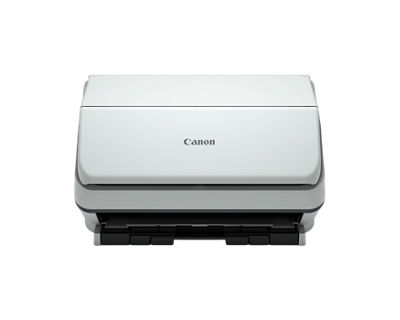
imageFORMULA R40II Office Document Scanner
Get started with these quick links.





DOWNLOADS

Locating and installing your download
 | Chrome |
- A grey bar will appear at the bottom of your browser window which will contain your download. To install your download click on the name of the downloaded file. Alternatively you can click 'Show all downloads...' to view the list of all recently downloaded files

- If the grey bar is not visible you can also access the list of recently downloaded files by clicking the 3 small horizontal lines
 located on the right of the address bar
 - Select 'Downloads' from the menu and the list of recently downloaded files will open
- From this list you can also install the download by clicking on the file name
- To open the folder on your computer that contains your downloaded files please select the 'Open downloads folder' link on the right of the page
- The folder that contains your download will now be open
 | Safari |
- Mac Users - Click the down arrow
 in the top right of the browser
 - Windows Users - Click the gear wheel
 in the top right of the browser
 - Click the small image of the magnifying glass
 next to your download
 - The folder that contains your download will now be opened
 | Firefox |
- Click the down arrow in the top right of the browser
- Windows Users - Click the small image of the folder
 next to your download
 - Mac Users - Click the small image of the magnifying glass next to your download
- The folder that contains your download will now be opened
 | Internet Explorer |
- Click the gear wheel in the top right of the browser
- Select 'View Download' from the menu
- Select 'Location' next to your download
- The folder that contains your download will now be opened
 | Microsoft Edge |
- Click the three dots icon in the top right of the browser
- Select 'Downloads' from the menu
- Select 'Open folder' next to your download
- The folder that contains your download will now be opened
There are no copying instructions for this browser
- Windows 11
- Windows 10 (x64)
- Windows 10
- Windows 8.1 (x64)
- Windows 8.1
- Windows 8 (x64)
- Windows 8
- Windows 7 (x64)
- Windows 7
- Windows Vista (x64)
- Windows Vista
- Windows Me
- Windows XP (x64)
- Windows XP
- Windows 98
- Windows 95
- Windows Server 2022
- Windows Server 2019 (x64)
- Windows Server 2016 (x64)
- Windows Server 2012 R2 (x64)
- Windows Server 2012 (x64)
- Windows Server 2008 R2 (x64)
- Windows Server 2008 (x64)
- Windows Server 2008
- Windows Server 2003 R2 (x64)
- Windows Server 2003 (x64)
- Windows Server 2003 R2
- Windows Server 2003
- macOS Tahoe v26
- macOS Sequoia v15
- macOS Sonoma v14
- macOS Ventura v13
- macOS Monterey v12
- macOS Big Sur v11.0
- macOS Catalina v10.15
- macOS Mojave v10.14
- macOS High Sierra v10.13
- macOS Sierra v10.12
- OS X El Capitan v10.11
- OS X Yosemite v10.10
- OS X Mavericks v10.9
- OS X Mountain Lion v10.8
- OS X Lion v10.7
- Mac OS X Snow Leopard v10.6
- Mac OS X v10.1
- Mac OS 9
- Linux ARM
- Linux MIPS
- Linux 64bit
- Linux 32bit
- SAP
- Windows Server 2025
- Windows NT
- Linux
Locating and installing your download
| Chrome |
- A grey bar will appear at the bottom of your browser window which will contain your download. To install your download click on the name of the downloaded file. Alternatively you can click 'Show all downloads...' to view the list of all recently downloaded files
- If the grey bar is not visible you can also access the list of recently downloaded files by clicking the 3 small horizontal lines located on the right of the address bar
- Select 'Downloads' from the menu and the list of recently downloaded files will open
- From this list you can also install the download by clicking on the file name
- To open the folder on your computer that contains your downloaded files please select the 'Open downloads folder' link on the right of the page
- The folder that contains your download will now be open
| Safari |
- Mac Users - Click the down arrow in the top right of the browser
- Windows Users - Click the gear wheel in the top right of the browser
- Click the small image of the magnifying glass next to your download
- The folder that contains your download will now be opened
| Firefox |
- Click the down arrow in the top right of the browser
- Windows Users - Click the small image of the folder next to your download
- Mac Users - Click the small image of the magnifying glass next to your download
- The folder that contains your download will now be opened
| Internet Explorer |
- Click the gear wheel in the top right of the browser
- Select 'View Download' from the menu
- Select 'Location' next to your download
- The folder that contains your download will now be opened
| Microsoft Edge |
- Click the three dots icon in the top right of the browser
- Select 'Downloads' from the menu
- Select 'Open folder' next to your download
- The folder that contains your download will now be opened
There are no copying instructions for this browser
SETUP & TROUBLESHOOTING
Find answers in our extensive knowledge base with dozens of articles and curated Q&As to help you troubleshoot your issue yourself.
SELECT ERROR CODE
Don’t see your error code? Let us know as we are capturing feedback for research purposes.
PRODUCT INFO
-
WINDOWS
-
macOS X
| Products | Windows 10 | Windows 11 |
|---|---|---|
| imageFORMULA R40II Office Document Scanner |
| Products | Ventura V13.0 | Sonoma V14 | Sequoia 15 |
|---|---|---|---|
| imageFORMULA R40II Office Document Scanner |
| Type | Office Document Scanner |
| Document Feeding | Automatic or Manual |
| Document Size - Width | 2" to 8.5" |
| Document Size - Length | 2.1" to 14" |
| Long Document Mode | Up to 240" |
| Document Weight | 7.2-110lb. Bond |
| Feeder Capacity | Up to 60 sheets |
| Light Source | RGB LED |
| Scanning Element | One-line contact image sensor (CIS) |
| Optical Resolution | 600 dpi |
| Output Resolution | 100 / 150 / 200 / 240 / 300 / 400 / 600 / 1200dpi |
| Grayscale Depth | 8-bit |
| Color Depth | 24-bit |
| Scanning Modes | Color, Grayscale, Black & White |
| Max. Scanning Speeds - Black and White | Up to 45 pages per minute (simplex), up to 90 images per minute (duplex)Footnote1 |
| Max. Scanning Speeds - Grayscale | Up to 45 pages per minute (simplex), up to 90 images per minute (duplex)Footnote1 |
| Max. Scanning Speeds - Color | Up to 45 pages per minute (simplex), up to 90 images per minute (duplex)Footnote1 |
| Interface | USB 2.0 Type-C |
| Weight | 7.05 lbs. |
| Dimensions (H x W x D) | 6.3" X 11.2" X 6.3" (trays closed) |
| Power Consumption | 15.6W or less (Sleep Mode: 0.6W) |
| Bundled Software | Canon CaptureOnTouch Scanning Software |
| Driver | Does not support TWAIN or ISIS drivers. CaptureOnTouch must be installed to use scanner. |
| Supported OS | Windows 11, MacOS 13, MacOS 14, MacOS 15 |
| Other Features | Auto Color Detection, Auto Page Size Detection, Auto Resolution Setting, Background Smoothing, Batch Separation, Character Emphasis, Color Dropout / Enhance Color, Deskew, Double-Feed Detection, Edge Emphasis, Folio Scan, Image Rotation, Moiré Reduction, MultiStream, Pre-Scan, Prevent Bleed-Through/Remove Background, Skip Blank Page, Text Enhancement, Text Orientation Recognition, Three-Dimensional Color Correction, Ultrasonic Double-Feed Detection, User Preferences |
Limited Warranty
The limited warranty set forth below is given by Canon U.S.A., Inc. and Canon Canada, Inc. ("Canon") with respect to your Canon imageFORMULA DR Scanner Product packaged with this limited warranty (the "Product"). Canon warrants the Product and Canon-brand accessories designed for use with the Product to be free from defects in workmanship and material under normal use and service for a period of one-year after delivery to the original purchaser (“Purchaser”) by Canon or its authorized dealer or reseller. During the relevant warranty period, Canon shall, in its sole discretion and without charge, repair or replace any defective part with a new or comparable rebuilt part or exchange the Product with a new or rebuilt Product. Warranty replacement shall not extend the warranty period of the defective Product. This warranty shall not extend to consumables (such as feed rollers, separation rollers, etc.) as to which there shall be no warranty or replacement.
The Product covered by this Limited Warranty will be exchanged or repaired by Canon or an authorized service provider (the "Service Provider"). To arrange for service for the Product under warranty, please call:
In the United States:
Your local Service Provider; or call
1-800-423-2366, Monday through Friday from 8:00 a.m. to 8:00 p.m., E.T.
In Canada:
Your local Service Provider; or call
1-800-OK-CANON, Monday through Friday from 9:00 a.m. to 8:00 p.m., E.T.
If the Product malfunction is not covered by this Limited Warranty or the applicable warranty period has expired or has not been sufficiently established by appropriate documentation, you will be charged for such service at the then-current service call rates of Canon or the Service Provider.
This warranty shall only apply if this Product is used in conjunction with compatible computers, peripheral equipment and software, as to which items Canon shall have no responsibility. NON-CANON Brand COMPUTERS, PERIPHERAL EQUIPMENT and SOFTWARE WHICH MAY BE DISTRIBUTED WITH THE PRODUCT ARE SOLD AS IS, WITHOUT WARRANTY OF ANY KIND BY CANON, INCLUDING ANY IMPLIED WARRANTY OF MERCHANTABILITY OR FITNESS FOR A PARTICULAR PURPOSE. The sole warranty, if any, with respect to such non-Canon brand item is given by the manufacturer or producer thereof.
THIS WARRANTY IS IN LIEU OF ALL OTHER WARRANTIES AND CONDITIONS, EXPRESS OR IMPLIED, INCLUDING ANY IMPLIED WARRANTIES AND CONDITIONS REGARDING MERCHANTABILITY OR FITNESS FOR A PARTICULAR PURPOSE, RELATING TO THE USE OR PERFORMANCE OF THE PRODUCT. NO OTHER EXPRESS WARRANTY, CONDITION OR GUARANTY, EXCEPT AS MENTIONED ABOVE, GIVEN BY ANY PERSON, FIRM OR CORPORATION WITH RESPECT TO THE PRODUCT SHALL BIND CANON OR ANY SERVICE PROVIDER. NO WARRANTY IS GIVEN ON ANY USED PRODUCT.
THIS WARRANTY SHALL BE VOID AND OF NO FORCE AND EFFECT IF THE PRODUCT IS DAMAGED AS A RESULT OF (A) ABUSE, NEGLECT, MISHANDLING, ALTERATION, ELECTRIC CURRENT FLUCTUATION OR ACCIDENT, (B) IMPROPER USE, INCLUDING FAILURE TO FOLLOW OPERATING OR MAINTENANCE INSTRUCTIONS IN OR ENVIRONMENTAL CONDITIONS PRESCRIBED IN, CANON'S USER'S GUIDE OR OTHER DOCUMENTATION FOR THE PRODUCT, (C) REPAIR BY OTHER THAN AUTHORIZED SERVICE PROVIDER REPRESENTATIVES QUALIFIED BY CANON WHO ARE ACTING IN ACCORDANCE WITH CANON'S SERVICE BULLETINS, (D) USE OF SUPPLIES OR PARTS (OTHER THAN THOSE DISTRIBUTED BY CANON) WHICH DAMAGE THE PRODUCT OR CAUSE ABNORMALLY FREQUENT SERVICE CALLS OR SERVICE PROBLEMS, OR (E) USE OF THE PRODUCT WITH NON-COMPATIBLE COMPUTERS, PERIPHERAL EQUIPMENT OR SOFTWARE, INCLUDING THE USE OF THE PRODUCT IN ANY SYSTEM CONFIGURATION NOT RECOMMENDED IN ANY MANUAL OR OTHER DOCUMENTATION FOR THE PRODUCT. NOR DOES THIS WARRANTY EXTEND TO ANY PRODUCT ON WHICH THE ORIGINAL IDENTIFICATION MARKS OR SERIAL NUMBERS HAVE BEEN DEFACED, REMOVED, OR ALTERED.
ANY SYSTEM SOFTWARE (WHETHER FACTORY LOADED ON THE PRODUCT OR CONTAINED ON THE SOFTWARE DISKETTES OR CD-ROMS ENCLOSED WITH, OR ACCOMPANYING, THE PRODUCT), AND ANY UTILITY SOFTWARE, DISTRIBUTED WITH OR FOR THE PRODUCT, IS SOLD "AS IS" AND WITHOUT WARRANTY BY CANON. THE SOLE WARRANTY WITH RESPECT TO SUCH SOFTWARE IS CONTAINED IN THE SOFTWARE MANUFACTURER'S LICENSE AGREEMENT DISTRIBUTED THEREWITH, INCLUDING ANY LIMITATIONS AND DISCLAIMERS THEREON. PLEASE CONTACT CANON IMMEDIATELY IF YOU HAVE NOT RECEIVED A COPY OF THE SOFTWARE MANUFACTURER'S LICENSE AGREEMENT.
NEITHER CANON NOR ANY SERVICE PROVIDER SHALL BE LIABLE FOR PERSONAL INJURY OR PROPERTY DAMAGE (UNLESS CAUSED SOLELY AND DIRECTLY BY THE NEGLIGENCE OF CANON OR ANY SERVICE PROVIDER), LOSS OF REVENUE OR PROFIT, FAILURE TO REALIZE SAVINGS OR OTHER BENEFITS, EXPENDITURES FOR SUBSTITUTE EQUIPMENT OR SERVICES, LOSS OR CORRUPTION OF DATA, STORAGE CHARGES OR OTHER SPECIAL, INCIDENTAL OR CONSEQUENTIAL DAMAGES CAUSED BY THE USE, MISUSE OR INABILITY TO USE THE PRODUCT REGARDLESS OF THE LEGAL THEORY ON WHICH THE CLAIM IS BASED AND EVEN IF CANON OR ANY SERVICE PROVIDER HAS BEEN ADVISED OF THE POSSIBILITY OF SUCH DAMAGES. NOR SHALL RECOVERY OF ANY KIND AGAINST CANON OR ANY SERVICE PROVIDER BE GREATER IN AMOUNT THAN THE PURCHASE PRICE OF THE PRODUCT CAUSING THE ALLEGED DAMAGE. WITHOUT LIMITING THE FOREGOING, THE PURCHASER ASSUMES ALL RISKS AND LIABILITY FOR LOSS, DAMAGE OR INJURY TO PERSONS AND PROPERTY OF THE PURCHASER OR OTHERS ARISING OUT OF THE POSSESSION, USE, MISUSE, OR INABILITY TO USE THE PRODUCT SOLD BY CANON NOT CAUSED SOLELY AND DIRECTLY BY THE NEGLIGENCE OF CANON OR ANY SERVICE PROVIDER. THIS LIMITED WARRANTY SHALL NOT EXTEND TO ANYONE OTHER THAN THE PURCHASER OF THE PRODUCT AND STATES SUCH PURCHASER'S EXCLUSIVE REMEDY.
CONDITIONS OF WARRANTY
Defective parts must be returned to Canon or a Service Provider with all necessary documentation and will become the property of Canon.
THIS WARRANTY APPLIES TO PRODUCTS PURCHASED AND USED IN THE U.S.A. AND CANADA ONLY.
CANON U.S.A., INC.
One Canon Park
Melville, NY 11747
CANON CANADA, INC.
6390 Dixie Road
Mississauga, Ontario L5T 1P7
Canada
ADDITIONAL SUPPORT

How-To Videos

Canon Community

Knowledge Base
CONTACT US

Thanks for signing up!
The application has encountered an unknown error. Please try again in a few minutes!
By clicking Sign Up, you are opting to receive promotional, educational, e-commerce and product registration emails from Canon USA. You can update your preferences or unsubscribe at anytime.