
Canon Support for MS-510 | Canon U.S.A., Inc.
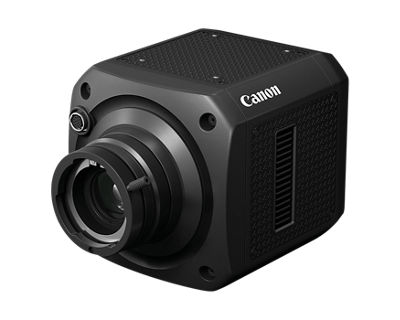
MS-510
Get started with these quick links.





DOWNLOADS

Locating and installing your download
 |
Chrome |
- A grey bar will appear at the bottom of your browser window which will contain your download. To install your download click on the name of the downloaded file. Alternatively you can click 'Show all downloads...' to view the list of all recently downloaded files

- If the grey bar is not visible you can also access the list of recently downloaded files by clicking the 3 small horizontal lines
 located on the right of the address bar
 - Select 'Downloads' from the menu and the list of recently downloaded files will open
- From this list you can also install the download by clicking on the file name
- To open the folder on your computer that contains your downloaded files please select the 'Open downloads folder' link on the right of the page
- The folder that contains your download will now be open
 |
Safari |
- Mac Users - Click the down arrow
 in the top right of the browser
 - Windows Users - Click the gear wheel
 in the top right of the browser
 - Click the small image of the magnifying glass
 next to your download
 - The folder that contains your download will now be opened
 |
Firefox |
- Click the down arrow in the top right of the browser
- Windows Users - Click the small image of the folder
 next to your download
 - Mac Users - Click the small image of the magnifying glass next to your download
- The folder that contains your download will now be opened
 |
Internet Explorer |
- Click the gear wheel in the top right of the browser
- Select 'View Download' from the menu
- Select 'Location' next to your download
- The folder that contains your download will now be opened
 |
Microsoft Edge |
- Click the three dots icon in the top right of the browser
- Select 'Downloads' from the menu
- Select 'Open folder' next to your download
- The folder that contains your download will now be opened
There are no copying instructions for this browser
- Windows 11
- Windows 10 (x64)
- Windows 10
- Windows 8.1 (x64)
- Windows 8.1
- Windows 8 (x64)
- Windows 8
- Windows 7 (x64)
- Windows 7
- Windows Vista (x64)
- Windows Vista
- Windows Me
- Windows XP (x64)
- Windows XP
- Windows 98
- Windows 95
- Windows Server 2022
- Windows Server 2019 (x64)
- Windows Server 2016 (x64)
- Windows Server 2012 R2 (x64)
- Windows Server 2012 (x64)
- Windows Server 2008 R2 (x64)
- Windows Server 2008 (x64)
- Windows Server 2008
- Windows Server 2003 R2 (x64)
- Windows Server 2003 (x64)
- Windows Server 2003 R2
- Windows Server 2003
- macOS Tahoe v26
- macOS Sequoia v15
- macOS Sonoma v14
- macOS Ventura v13
- macOS Monterey v12
- macOS Big Sur v11.0
- macOS Catalina v10.15
- macOS Mojave v10.14
- macOS High Sierra v10.13
- macOS Sierra v10.12
- OS X El Capitan v10.11
- OS X Yosemite v10.10
- OS X Mavericks v10.9
- OS X Mountain Lion v10.8
- OS X Lion v10.7
- Mac OS X Snow Leopard v10.6
- Mac OS X v10.1
- Mac OS 9
- Linux ARM
- Linux MIPS
- Linux 64bit
- Linux 32bit
- SAP
- Windows Server 2025
- Windows NT
- Linux
Locating and installing your download
|
Chrome |
- A grey bar will appear at the bottom of your browser window which will contain your download. To install your download click on the name of the downloaded file. Alternatively you can click 'Show all downloads...' to view the list of all recently downloaded files
- If the grey bar is not visible you can also access the list of recently downloaded files by clicking the 3 small horizontal lines located on the right of the address bar
- Select 'Downloads' from the menu and the list of recently downloaded files will open
- From this list you can also install the download by clicking on the file name
- To open the folder on your computer that contains your downloaded files please select the 'Open downloads folder' link on the right of the page
- The folder that contains your download will now be open
|
Safari |
- Mac Users - Click the down arrow in the top right of the browser
- Windows Users - Click the gear wheel in the top right of the browser
- Click the small image of the magnifying glass next to your download
- The folder that contains your download will now be opened
|
Firefox |
- Click the down arrow in the top right of the browser
- Windows Users - Click the small image of the folder next to your download
- Mac Users - Click the small image of the magnifying glass next to your download
- The folder that contains your download will now be opened
|
Internet Explorer |
- Click the gear wheel in the top right of the browser
- Select 'View Download' from the menu
- Select 'Location' next to your download
- The folder that contains your download will now be opened
|
Microsoft Edge |
- Click the three dots icon in the top right of the browser
- Select 'Downloads' from the menu
- Select 'Open folder' next to your download
- The folder that contains your download will now be opened
There are no copying instructions for this browser

Camera Connect
Digital Photo Professional Express

image.canon
Software Development Kit
The Canon EOS Digital Camera Software Development Kit (EDSDK) and the Camera Control API (CCAPI) are available on select Canon cameras1 and enables developers to integrate select Canon cameras directly into their software application solutions, giving them access to remote control and communication functionality of the camera. The EDSDK supports USB communication on Windows, Macintosh, and Linux operating systems, while the CCAPI uses Wi-Fi (Ethernet on select cameras) and can be used with almost any OS.
The EDSDK and CCAPI (along with other SDKs and APIs) are provided free of charge and more information can be found at https://www.usa.canon.com/support/sdk.
1. Compatibility list available on Canon Developer Community website
SETUP & TROUBLESHOOTING
Find answers in our extensive knowledge base with dozens of articles and curated Q&As to help you troubleshoot your issue yourself.
SELECT ERROR CODE
Don’t see your error code? Let us know as we are capturing feedback for research purposes.
PRODUCT INFO
| Tech. Specs. Detailed PDF | View Full Details of Technical Specifications |
| Sensor | -1" SPAD Sensor |
| Total Pixels | 3.2M |
| Effective Pixels | 2.1M |
| Maximum Resolution | 1920x1080 |
| Minimum Subject Illumination | 0.0006 lux (Color (Night Mode), no light accumulation, f/1.4 equivalent, shutter speed 1/30, 50IRE, maximum gain 84 dB, Custom Picture [CrispImg2]) |
| Lens Mount | Bayonet lens mount based on BTA S-1005B standards |
| SDI Terminal | 3G/HD-SDI (4:2:2 10-bit) BNC jack (output only) x 1, 0.8 Vp-p/75 , unbalanced 3G-SDI: SMPTE 424, SMPTE 425, SMPTE ST 299-2 HD-SDI: SMPTE 292, SMPTE ST 299-1 Time code (VITC/LTC) |
| LAN Terminal | RJ-45 for IP Video Streaming and Control |
| Remote Terminal | RS-232C/RS-422/RS-485 NU Protocol (Canon proprietary, Serial), Pelco-D |
| GenLock Terminal | BNC jack (input only) x 1, 1.0 Vp-p/75 |
| Lens Terminal | Circular 12-pin Jack x1 |
| Ext. Device I/O Terminal | Input x2, Output x2 (for future expansion) |
| Memory Card | microSD card slot x1 (not recordable, for future expansion) |
| Focus Control | Manual, One-shot AF AF frame: Large, Small AF frame position: Center, Specified area |
| Resolution/Frame Rate | Frame Frequency 59.94P: 1920 x 1080: 59.94P*, 59.94i (4:2:2 10 bit) 1280 x 720: 59.94P (4:2:2 10 bit) * 3G-SDI mapping Level A/B supported Frame Frequency 29.97P: 1920 x 1080: 29.97P, 29.97PsF (4:2:2 10-bit) Frame Frequency 50.00P: 1920 x 1080: 50.00P*, 50.00i (4:2:2 10-bit) 1280 x 720: 50.00P (4:2:2 10 bit) *3G-SDI mapping Level A/B supported Frame Frequency 25.00P: 1920 x 1080: 25.00P, 25.00PsF (4:2:2 10-bit) |
| Shutter Speed | 1/4000s to 1/4s [59.94P], 1/4000s to 1/4s [29.97P], 1/4000s to 1/3s [50.00P], 1/4000s to 1/3s [25.00P] |
| Optical Filters | ND filter: motor operated insertion-extraction (manual/automatic), 1 density level (approx. 1/64) IR cut filter: motor operated insertion-extraction (manual/automatic) |
| Exposure | Auto, Tv, Av, AGC, Manual AE Shift |
| Metering Mode | Standard, Spotlight, Backlight, AF Frame Metering |
| White Balance | Manual (MWB), AWB, White Balance Set A (WB-A), White Balance Set B (WB-B), Daylight (Dylt), Tungsten (Tung), Color Temperature (Kelv) Preset setting/color temperature setting: available |
| Auto Black Balance | Available |
| Iris | Manual |
| Gain | 0.0-84.0 dB (3.0 84.0 dB if gamma is BT.709 Standard, 12.0 84.0 dB if Canon 709) |
| AGC Upper/Lower Limit | Available |
| Custom Picture | CrispImg2, BT.709 Standard, Canon 709 |
| Day/Night Switch | Auto/Day Mode/Night Mode |
| Color Bars | SMPTE, ARIB, EBU |
| Smart Shade Control (SSC) | Available |
| Haze Compensation | Available |
| Diffraction Correction | Available (excluding certain non-supported lenses) |
| Chromatic Aberration Correction | Available (excluding certain non-supported lenses) |
| Digital Zoom | Available 10x (Max.) |
| On-Screen Display | Available (English/Japanese) |
| Video Compression | JPEG, MPEG-4 AVC/H.264, H.265/HEVC |
| Video Size | 1920 x 1080, 1280 x 720, 640 x 360, 320 x 180 |
| Video Output Frame Rate | JPEG: 0.1 15 fps MPEG-4 AVC/H.264, H.265/HEVC Frame Frequency 59.94P/29.97P: 0.99/4.99/9.99/14.98/29.97/59.94 fps Frame Frequency 50.00P/25.00P: 1/5/12.5/25/50 fps |
| Network Protocol | IPv4, IPv6, TCP/IP, UDP, HTTP, SNMPv1/v2c/v3 (MIB2), RTP/RTCP, RTSP, DHCP, AutoIP, DNS, mDNS, ARP, ICMP, NTP, SSL/TLS |
| Control Protocol | ONVIF (Profile S), WV-HTTP (Canon proprietary), WVCOM (Canon proprietary) |
| External Power | External power source: 12 30 V DC (connector included) |
| Power Consumption | DC input: Max. 23.7 W (camera body only) |
| Temperature | Operating temperature range: -20°C +45°C (-4°F +113°F) Start-up temperature range: -10°C +45°C (-14°F +113°F) Storage temperature range: -30°C +60°C (-22°F +140°F), 5%-90% Humidity without condensation |
| Dimensions | Approx. 128 x 128 x 184 mm (5.04 x 5.04 x 7.24 in.) (excluding protrusions) |
| Weight | Approx. 2.2 kg (4.86 lb.) (camera body only) |
ADDITIONAL SUPPORT

How-To Videos

Canon Community

Knowledge Base
CONTACT US

Thanks for signing up!
The application has encountered an unknown error. Please try again in a few minutes!
By clicking Sign Up, you are opting to receive promotional, educational, e-commerce and product registration emails from Canon USA. You can update your preferences or unsubscribe at anytime.