
Canon Support for EOS R8 Mark II Camera (Body) | Canon U.S.A., Inc.
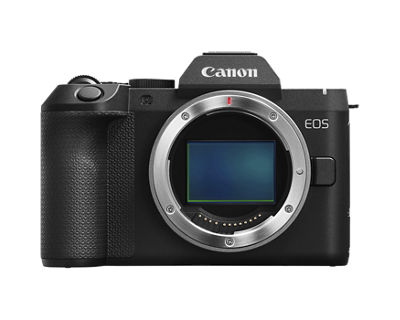
EOS R8 Mark II
Get started with these quick links.





Protect your product with CarePAK PLUS. Learn More
Purchase this product's accessories and more. Shop Now
Looking for help with your order? Order help
DOWNLOADS

Locating and installing your download
 | Chrome |
- A grey bar will appear at the bottom of your browser window which will contain your download. To install your download click on the name of the downloaded file. Alternatively you can click 'Show all downloads...' to view the list of all recently downloaded files

- If the grey bar is not visible you can also access the list of recently downloaded files by clicking the 3 small horizontal lines
 located on the right of the address bar
 - Select 'Downloads' from the menu and the list of recently downloaded files will open
- From this list you can also install the download by clicking on the file name
- To open the folder on your computer that contains your downloaded files please select the 'Open downloads folder' link on the right of the page
- The folder that contains your download will now be open
 | Safari |
- Mac Users - Click the down arrow
 in the top right of the browser
 - Windows Users - Click the gear wheel
 in the top right of the browser
 - Click the small image of the magnifying glass
 next to your download
 - The folder that contains your download will now be opened
 | Firefox |
- Click the down arrow in the top right of the browser
- Windows Users - Click the small image of the folder
 next to your download
 - Mac Users - Click the small image of the magnifying glass next to your download
- The folder that contains your download will now be opened
 | Internet Explorer |
- Click the gear wheel in the top right of the browser
- Select 'View Download' from the menu
- Select 'Location' next to your download
- The folder that contains your download will now be opened
 | Microsoft Edge |
- Click the three dots icon in the top right of the browser
- Select 'Downloads' from the menu
- Select 'Open folder' next to your download
- The folder that contains your download will now be opened
There are no copying instructions for this browser
- Windows 11
- Windows 10 (x64)
- Windows 10
- Windows 8.1 (x64)
- Windows 8.1
- Windows 8 (x64)
- Windows 8
- Windows 7 (x64)
- Windows 7
- Windows Vista (x64)
- Windows Vista
- Windows Me
- Windows XP (x64)
- Windows XP
- Windows 98
- Windows 95
- Windows Server 2022
- Windows Server 2019 (x64)
- Windows Server 2016 (x64)
- Windows Server 2012 R2 (x64)
- Windows Server 2012 (x64)
- Windows Server 2008 R2 (x64)
- Windows Server 2008 (x64)
- Windows Server 2008
- Windows Server 2003 R2 (x64)
- Windows Server 2003 (x64)
- Windows Server 2003 R2
- Windows Server 2003
- macOS Golden Gate v27
- macOS Tahoe v26
- macOS Sequoia v15
- macOS Sonoma v14
- macOS Ventura v13
- macOS Monterey v12
- macOS Big Sur v11.0
- macOS Catalina v10.15
- macOS Mojave v10.14
- macOS High Sierra v10.13
- macOS Sierra v10.12
- OS X El Capitan v10.11
- OS X Yosemite v10.10
- OS X Mavericks v10.9
- OS X Mountain Lion v10.8
- OS X Lion v10.7
- Mac OS X Snow Leopard v10.6
- Mac OS X v10.1
- Mac OS 9
- Linux ARM
- Linux MIPS
- Linux 64bit
- Linux 32bit
- SAP
- Windows Server 2025
- Windows NT
- Linux
Locating and installing your download
| Chrome |
- A grey bar will appear at the bottom of your browser window which will contain your download. To install your download click on the name of the downloaded file. Alternatively you can click 'Show all downloads...' to view the list of all recently downloaded files
- If the grey bar is not visible you can also access the list of recently downloaded files by clicking the 3 small horizontal lines located on the right of the address bar
- Select 'Downloads' from the menu and the list of recently downloaded files will open
- From this list you can also install the download by clicking on the file name
- To open the folder on your computer that contains your downloaded files please select the 'Open downloads folder' link on the right of the page
- The folder that contains your download will now be open
| Safari |
- Mac Users - Click the down arrow in the top right of the browser
- Windows Users - Click the gear wheel in the top right of the browser
- Click the small image of the magnifying glass next to your download
- The folder that contains your download will now be opened
| Firefox |
- Click the down arrow in the top right of the browser
- Windows Users - Click the small image of the folder next to your download
- Mac Users - Click the small image of the magnifying glass next to your download
- The folder that contains your download will now be opened
| Internet Explorer |
- Click the gear wheel in the top right of the browser
- Select 'View Download' from the menu
- Select 'Location' next to your download
- The folder that contains your download will now be opened
| Microsoft Edge |
- Click the three dots icon in the top right of the browser
- Select 'Downloads' from the menu
- Select 'Open folder' next to your download
- The folder that contains your download will now be opened
There are no copying instructions for this browser
Camera Connect
Digital Photo Professional Express

image.canon
Software Development Kit
The Canon EOS Digital Camera Software Development Kit (EDSDK) and the Camera Control API (CCAPI) are available on select Canon cameras1 and enables developers to integrate select Canon cameras directly into their software application solutions, giving them access to remote control and communication functionality of the camera. The EDSDK supports USB communication on Windows, Macintosh, and Linux operating systems, while the CCAPI uses Wi-Fi (Ethernet on select cameras) and can be used with almost any OS.
The EDSDK and CCAPI (along with other SDKs and APIs) are provided free of charge and more information can be found at https://www.usa.canon.com/support/sdk.
1. Compatibility list available on Canon Developer Community website
SETUP & TROUBLESHOOTING
Find answers in our extensive knowledge base with dozens of articles and curated Q&As to help you troubleshoot your issue yourself.
SELECT ERROR CODE
Don’t see your error code? Let us know as we are capturing feedback for research purposes.
PRODUCT INFO
| Tech. Specs. Detailed PDF | View Full Details of Technical Specifications |
| Type | Full-frame, mirrorless interchangeable lens camera |
| Image Processor | (one) DIGIC X |
| Recording Media | (one) SDXC / SDHC / SD card; UHS-II compatible Eye-Fi and MultiMedia Cards (MMC) not compatible |
| Compatible Lenses | Canon RF and RF-S lenses Canon EF, EF-S and TS-E lenses (with optional Mount Adapter EFEOS R) |
| Lens Mount | Canon RF mount |
| Type | Canon full-frame CMOS sensor (compatible with Dual Pixel CMOS AF) |
| Effective Pixels | Approx. 24.2 million pixels |
| Pixel Size | Approx. 6.0 microns square |
| Total Pixels | 25.6 million pixels |
| Aspect Ratio | 3:2 (Horizontal : Vertical) |
| Color Filter System | RGB primary colors |
| Low-pass Filter | Installed at front of sensor; non-removeable |
| Dust Deletion Feature (Self Cleaning Sensor Unit) | Auto cleaning: at Power Off / Enable (at power On Off) / Disable Clean now (user-activated cleaning) Clean manually (shutter blades held open for user cleaning of sensor) |
| Video resolutions | RAW: none 4K UHD (oversampled) estimated recording time, video bit rate, file size, and SD card requirements
Video bit rate indicates video only; audio and metadata are not included Figures above are obtained when [Audio format: AAC / 16 bit / 2CH] is set Movie recording stops when maximum time per movie is reached Full HD
Video bit rate indicates video only; audio and metadata are not included Figures above are obtained when [Audio format: AAC / 16 bit / 2CH] is set Movie recording stops when maximum time per movie is reached |
|||||||||||||||||||||||||||||||||||||||||||||||||||||||||||||||||||||||||||||||||||||||||||||||||||||||||||||||||||||||||||||||||||||||||||||||||||||||||||||||||
| FPS speeds | MP4: 4K (UHD 16:9 only) 23.98 to 59.94 FPS (with sound) MP4: Full HD 23.98 to 179.8 FPS (w/ sound) 4K video oversampled from 6K, at all FPS speeds [Fine] not user-selectable 24.00 FPS not available |
|||||||||||||||||||||||||||||||||||||||||||||||||||||||||||||||||||||||||||||||||||||||||||||||||||||||||||||||||||||||||||||||||||||||||||||||||||||||||||||||||
| Recording Format | DCIF (Design rule for Camera File system 2.0; EXIF 3.0 |
| Image Format | Still image format: RAW: Canon RAW / C-RAW (.CR3) JPEG / HEIF: L / M / S1 / S2 Movie image format (user-selectable in red Shooting Menu): XF-HEVC S YCC 422 10-bit XF-HEVC S YCC 420 10-bit XF-AVC S YCC 422 10-bit XF-AVC S YCC 420 8-bit |
| Folder | Automatically created when card is inserted DCIM / XFVC / MISC folders |
| Folder Actions | Select folder / Create folder (new folder name can be user-changed) |
| Still Images | DCF standards compliant Default (within DCIM folder) xxx_R8M2 Can be changed by user to any 5-character string |
| Movies | XFVC folder: XF-HEVC S / XF-AVC S file formats REEL_xxxx (MP4 video file in XFVC folder) |
| News Metadata | Not supported |
| Settings | Auto (AWB); includes Ambience priority / White priority Daylight Shade Cloudy Tungsten light White fluorescent light Flash Custom WB Color Temp (four manual user pre-sets available: K1 K4) |
| White Balance Shift | Shift Blue / Amber bias: ±9 levels Magenta / Green bias: ±9 levels Blue/amber and magenta/green shift can be combined WB Bracketing available: ±3 levels |
| Type | OLED electronic eye-level viewfinder OLED screen size approx. 0.39 inch |
| Viewfinder resolution | Approx. 2.36 million dots |
| Magnification | Approx. 0.70x |
| Eyepoint | Approx. 22mm (at -1m-1 from eyepiece lens) |
| Dioptric adjustment | Approx. -4.0 +1.0 (user-adjustable) |
| Viewfinder brightness Auto (adjusts automatically to suit metering results) | Manual (adjustable in 5 steps, in yellow Set-up Menu) |
| Display simulation (Viewfinder & LCD screen) | Exposure simulation + Depth-of-field Exposure simulation Exposure simulation only when DOF preview pressed Disable (displays adjust for proper viewing, regardless of actual exposure) |
| Optical Viewfinder Simulation | (EVF and LCD screen) On / Off Display adjusts to reduce contrast, and improve light/dark details Display does not reflect actual exposure, and various camera settings such as Picture Style, WB, HDR PQ, etc. |
| HDR / C.Log View Assist (Viewfinder & LCD screen) | Available during HDR PQ, or when Canon Log 3 / PQ / HLG is set in Custom Picture settings |
| Type | TFT color, liquid-crystal monitor |
| Size | 3.0 inch (3:2 aspect ratio); diagonal approx. 2.95 in. / 7.5 cm |
| Resolution | Approx. 1.62 million dots |
| Touch-screen Operation | Yes (capacitive sensing) |
| Vari-Angle Adjustment | Opening angle: approx. 0175° Rotating angle: forward approx. 090° / backward approx. 0180° |
| Coatings | Anti-smudge coating (anti-reflection coating not applied) |
| Magnified View (still images) | 1.5x 10x |
| AF Point Display (still images) | Available |
| Highlight Alert | Available (blinking highlights, during single-image display) |
| Auto Rotate | On (display + computer) / On (computer only) / Off Video: via Change movie rotation information |
| Search | By Rating / Date / Folder / Protection / Type of file (1) / Type of file (2) [Protect when setting the rating] can be set. |
| Ratings (Star) | Off / Star ratings 15 |
| Protect Images | Select images / Select range / All images in folder / Unprotect all images in folder / Unprotect all images on card / All found images / Unprotect all found images / All images on card |
| Image Copy (to card on camera) | Not Available |
| Focus Type | Dual Pixel CMOS AF (from CMOS imaging sensor) |
| AF Zones for Auto Selection | Still images: max. 1,053 zones Movies: max. 1,053 zones (when 4K is active) With focusing area approx. 100% x 100% |
| Selectable AF Point Positions | Still images: max. 4,368 positions (78x56) Movies: max. 3,588 positions (78x46) User-adjustable AF point positioning over approx. 90% (H) x 100% (V) |
| AF Brightness Range | Still images: EV -7.5 21 Movies: EV -5.5 21 (Full HD: EV -5.0 21) With f/1.2 lens (except DS lenses); center AF point; One-shot AF; ISO 100 |
| AF Areas | Spot AF 1-point AF Expand AF (4-point expansion) Expand AF (8-point expansion) Flexible Zone AF 1 Flexible Zone AF 2 Flexible Zone AF 3 Whole Area AF |
| AF Subject Detection | Auto People Animals (dogs / cats / birds / horses) Vehicles (motorsports cars & motorcycles / aircraft / trains) Certain types of animals or vehicles may not be detectable Register People Priority available, for up to ten human subjectsFootnote4 |
| Eye Detect AF | Auto (camera selects most prominent eye for focusing) Right Eye (prioritizes subjects right eye) Left Eye (prioritizes subjects left eye) Disable |
| Defocus (video only) | (via user-customized button) Intentional shift of focus from sharp original
subject to a de-focused, blurred state Available in AF mode only; [Movie Servo AF] will be paused Blur amount user-selectable during defocus (1 5) AF speed during defocus user-selectable (1 10) Defocus effects may not be suitable, depending on lens, scene, and recording conditions |
| AF-assist beam Built-in to camera | Compatible white LED AF-assist beams on Canon speedlites Intermittent flash AF-assist beams and red AF-assist beams on speedlites not compatible |
| Manual focus aids | Focus guide / MF Peaking |
| Focus Bracketing | User-enabled 2 999 source images can be taken (user-defined in Menu) User selects Focus increment, from 1 (narrow) to 10 (wide) In-camera compositing of a finished JPEG image Source images can also be composited in Canon Digital Photo Professional software, or other compatible third-party software Electronic shutter only; flash not possible |
| Metering modes (stills) | Evaluative metering (linked to active AF point / Area) Partial metering (approx. 5.9% of image area, at center of screen) Spot metering (approx. 3.0% of image area, at center of screen) Center-weighted average metering Partial and Spot metering: circle appears at center of LCD screen Spot metering cannot be linked to off-center AF point locations |
||||||||||||||
| Metering modes (movies) | Evaluative metering (only) | ||||||||||||||
| Metering Range | (still images) EV -320 (movies) EV -120 |
||||||||||||||
| Exposure Modes (stills) | A+ (Scene Intelligent Auto) P (Program AE) Fv (Flexible-priority AE) Tv (Shutter-priority AE) Av (Aperture-priority AE) M (Manual exposure) C1 C3 (Custom shooting modes) B (Bulb mode) S&F (Program AE) Movie for close-up demos reverts to Scene Intelligent Auto SCN (Special scene modes) |
||||||||||||||
| SCN (Special Scene Modes, stills) |
|
||||||||||||||
| Exposure Modes (movies) | A+ (Scene Intelligent Auto movies) P (Movie auto exposure) Tv (Movie shutter-priority AE) Av (Movie aperture-priority AE) M (Movie manual exposure) Fv reverts to movie auto exposure S&F (Slow and Fast settable on LCD screen for P, Tv, Av, or M) C1 C3 (movie Custom shooting modes) B reverts to movie auto exposure SCN Special scene modes |
||||||||||||||
| SCN (Special Scene Modes, movies) | Smooth Skin Movie Movie IS mode Movie for Close-up Demos |
||||||||||||||
| ISO Speed Range (stills) | Normal ISO 100 102,400 Expanded ISO 50 204,800 (equivalent) Minimum ISO 200 when Highlight Tone Priority is active) |
||||||||||||||
| ISO Speed Range (video) | ISO 100 25,600 ISO range varies, depending on Custom Picture and similar settings Expanded: max. ISO 102,400 for movies (varies, depending on settings) |
||||||||||||||
| Auto ISO Range (stills) | Minimum: L (ISO 50) or 100 ISO 51,200 (expandable to ISO 102,400) | ||||||||||||||
| Auto ISO Range (video) | ISO 100 25,600 (expandable to ISO 102,400) | ||||||||||||||
| Exposure Compensation | ±0.3 3 stops, in 1/3 or 1/2-stop increments | ||||||||||||||
| Auto Exposure Bracketing | ±0.3 3 stops, in 1/3 or 1/2-stop increments (2, 3, 5, or 7 still image shots selectable) |
||||||||||||||
| AE Lock | Applied automatically: AE is locked as soon as subjects are in focus using One-Shot AF when set to
[C.Fn2: AE lock meter. mode after focus]. Applied manually: Use the AE lock button (update by pressing the button again) in Fv, P, Tv, Av, and M modes. (Enabled in all metering modes.) |
| Type | Electronically controlled focal-plane shutter Rolling shutter, using CMOS image sensor |
| Shutter Modes (stills) | Electronic 1st-curtain Electronic shutter Mechanical shutter not available |
| Shutter speeds (stills) | Electronic 1st-curtain: 1/4000 30 seconds, plus Bulb Electronic shutter: 1/16,000 30 seconds, plus Bulb 1/16,000 only available in Fv, Tv, or M modes Electronic shutter up to 1/8000 in P or Av modes 1/16,000 cannot be adjusted in or ½-stop increments Electronic shutter max. 1/8000 in HDR mode, Focus Bracketing, or if same exposure for new aperture is active |
| Flash sync speed | Electronic 1st-curtain only: max. 1/200 sec. 1/250 sec. With Sync Speed Priority active (Canon speedlites only) 1/250 sec. in 1.6x (crop) mode Flash not possible with Electronic shutter |
| Self-timer | 10 sec. / 2 sec. / Continuous Continuous self-timer: 29 shots fired continuously, after 10 sec. Delay |
| Shutter type (movies) | Rolling shutter, using CMOS image sensor |
| Shutter speeds (movies) | 1/8000 sec. 1/8 sec. (slowest speed is based on movie FPS rate) 1/8 sec. minimum in Tv or M movie modes 1/25 sec. minimum in other movie shooting modes |
| Shutter covers sensor | None, at shut-down |
| Drive modes (still images) | Electronic 1st-curtain: High speed continuous + 6 FPS* High speed continuous 6 FPS Low speed continuous 3.0 FPS Single shooting Electronic shutter: High speed continuous + 40 FPS* High speed continuous 20 FPS Low speed continuous 5.0 FPS Single shooting Self-timer (10 sec. / 2 sec. / Continuous) *Maximum FPS continuous still-image shooting (Continuous H+ Drive mode) depends upon camera settings; in some shooting conditions (slow shutter speeds, etc.), maximum FPS may not be possible |
| Pre-continuous shooting (still images) | Records 20 shots (approx. 0.5 sec.) before shutter button fully pressed RAW, C-RAW, JPEG or HEIF images available Electronic shutter and Continuous H+ drive must be set by user Flash photography, AEB shooting, and some other functions not Available |
| Burst rate (continuous still images until camera slows to write to SD card) | RAW 73 continuous images (40 FPS, Electronic shutter) 1,000 or more (6 FPS, 1st-curtain Electronic shutter) Large/Fine JPEG 190 continuous images (40 FPS, Elec shutter) 1,000 or more (6 FPS, 1st-curtain Elec shutter) |
| Still-image IS | In-body Image Stabilization (IBIS), using CMOS sensor Coordinated IS combined IBIS + optical IS, with IS lenses Coordinated IS correction: Center 7.5 stops; Peripheral 7.0 stopsFootnote1 (tests conforming to CIPA standards, using RF24-105mm F2.8 L IS USM Z lens) |
| Movie Digital IS | 5-axis digital stabilization, at CMOS image sensor Independently activated (vs. IBIS); Coordinated IS available (Movie Digital IS + IBIS + lens optical IS, if available) |
| HDR shooting (PQ) | Available Still images: 10-bit HEIF images; YCbCr 4:2:2; Rec. ITU-R BT-2100 (PQ) Video: Depends on recording format setting |
| HDR Mode | Still images: Off / Moving subject / Dynamic range Moving subject HDR created from single exposure Dynamic range: Captures three source images; one finished JPEG image written to memory card (source images can be saved) Dynamic range source images: Auto / ±1 EV / ±2 EV / ±3 EV |
| HDR Movie Mode | None (HDR PQ video is available) |
| (still images and video) | NegativeFilmtone PositiveFilmtone StoryTeal&Orange StoryMagenta StoryBlue PaleTeal&Orange RetroGreen Sepiatone AccentRed TastyWarm TastyCool BrightAmber BrightWhite ClearLightBlue ClearPurple ClearAmber Color Filter strength can be adjusted from 100% to 10% Not available for RAW or C-RAW still images, HDR (PQ), multiple exposures, or focus bracketing Cannot be set in Basic Zone exposure modes Movies: cannot be used with HDR (PQ) or Time-lapse movies |
| Maximum Recording | Times Less than 100.0 FPS: maximum 6 hours 00 minutes Over 100 FPS: maximum 2 hours 00 minutes Recording time can be shorter, from factors such as battery power or shut-down from heat |
| Cooling Fan | None (no accessory cooling grip available) |
| Overheating shut-down times (at 73°F / 23°C, internal and external temperatures) | 4K at 29.97 FPS, Standard LGOP no restrictions Full HD at 29.97 FPS, Standard LGOP no restrictions (Auto power off temperature setting at Standard) |
| Overheat warning | Thermometer icon, and 10-stage analog scale to indicate rising temps |
| Open Gate Recording | None |
| Canon Log Recording Canon Log 3 (in Custom Picture menu) | Dynamic range, with Canon Log 3 approx. 1600%; 14 stops (4K; at 29.97/25.00 FPS; ISO 800) |
| Custom Picture (CP) Canon 709 / Canon Log 3 / PQ / HLG / BT709 Standard | available for video recording only User06 User20 spaces available CP files can be re-named, and extensively adjusted |
| Proxy Movie Recording | None |
| Main / Sub Recording | None |
| S&F (Slow & Fast recording) | Recording FPS: 180 1.0 FPS some restrictions, depending on movie record format, resolution, etc. sound not recorded Playback FPS: (NTSC video system) 23.98; 29.97, or 59.94 FPS (PAL video system) 24.00; 25.00, or 50.00 FPS |
| Time-lapse Movie Recording | Interval between frames: 2 seconds 99:59:59 Shutter count: 2 frames 3,600 frames Recording size: 4K UHD / Full HD Playback speed 29.97 / 25.00 FPS (approx. 2 min. for 3,600 frames) Movie record formats available: XF-AVC S YCC422 10-bit XF-AVC S YCC420 8-bit |
| HDMI RAW recording to Compatible external recorders | None (no RAW video recording capability) HDMI recording of MP4 format video is possible |
| Time Code | Available |
| Pre-recording (movies) | Records 3 or 5 seconds of video, before user begins video recording 3 / 5 seconds Pre-recording set by user |
| Video Displays (Viewfinder & LCD screen) | Grid display / Histogram / Zebra display / False Color display / Electronic level / Recording emphasis / Aspect Marker 1 & 2
User-set in red shooting menu > Shooting info display (Histogram set in Brightness Info) Waveform display not available Zebra display and False Color displays available in Shooting Info Display menu area, during video operation only |
| Built-in Microphone | Stereo mic, on top of camera body 48 kHz; 24 or 16 bit; 2 channels |
| External Microphone Terminal | 3.5mm diameter stereo mini-jack (3-pin) Plug-in power supported |
| Multi-function Shoe Input | Compatible with Canon Directional Stereo Microphone DM-E1D |
| Headphone Terminal | 3.5mm diameter stereo mini jack Audio monitoring possible via headphone terminal, or HDMI |
| DPOF Compatibility | DPOF version 1.1 PictBridge printing not available |
| Print Type | Standard / Index / Both |
| Photobook Set-up | None |
| Start-up Password | 6-digit password (set by user) required first time camera turned on,
or when [Clear Entered Information] is performed in-camera Password normally required at each start-up, or when awakening from sleep Password request can be set to OFF, by user Password can be changed at any time by user |
| Wi-Fi (Wireless LAN) | 5.0 GHz / 2.4 GHz band EOS Utility / Image.canon / Canon Camera Connect6 / Content Transfer Professional7 / Camera Control API * Apps are available on the iOS app store and Google Play store. Full use of all app features In Content Transfer Professional requires a paid subscription. |
| Maximum Link Speed | 5.0 GHz: (IEEE 802.11ax) 143.4 Mbps (IEEE 802.11ac) 86.7 Mbps (IEEE 802.11n) 72.2 Mbps (IEEE 802.11a) 54 Mbps 2.4 GHz: (IEEE 802.11g) 54 Mbps (IEEE 802.11b) 11 Mbps |
| Frequency; Channels | 5.0 GHz: 5180 5825 MHz; 36 to 165 channels 2.4 GHz: 2412 2462 MHz; 1 to 11 channels |
| Wireless LAN Setting Method | Connect via wizard / Connect via Wi-Fi Protected Setup |
| Wired LAN | None |
| Version | Specification Version 5.3 compliant |
| Transmission Method | GFSK modulation |
| Bluetooth Communication Functions | Canon Camera Connect App / Canon Bluetooth Remote Controller BR-E1 / BR-E2 |
| Bluetooth Pairing | Smartphone up to 10 units; BR-E1/E2 remote controller 1 unit |
| Live Streaming | USB (UVC/UAC streaming) / HDMI streaming / Camera Connect app
streaming / Live Switcher Mobile app streaming USB power Delivery supported; requires power supply 5 V / 1.5 A or greater Video only; not possible during S&F recording, or still-image shooting Only P / M / Smooth skin movie modes can be set |
| Live Streaming Formats | Video: Motion JPEG compression method; YCC 4:2:2 color sampling; 8-bits; Custom Picture supported; Recording range full range |
| Resolution / FPS rates | 4K 30 FPS; 4K 60 FPS (60 FPS not available in Smooth skin mode);
Full HD 60 FPS; Full HD 30 FPS 60 or 30 FPS, regardless of NTSC / PAL settings |
| USB Terminal | USB-C (equivalent to USB 10 Gbps / SuperSpeed Plus USB / USB 3.2 Gen 2) |
| HDMI Terminal | Type D size (micro HDMI terminal) |
| Remote Control Terminal | Canon E3 type terminal (single-pin connector into camera) Optional Canon RA-E3 Remote Controller Adapter allows Canon 3-pin (N3) to be connected |
| External Mic IN Terminal | 3.5mm diameter stereo mini jack (3-pin) |
| Terminal | 3.5mm diameter stereo mini jack |
| Flash Sync Terminal | Not Supported |
| Battery | (one) Canon LP-E17 battery pack Canon Battery Charger LC-E17 (included) |
| Optional Battery Grip | None |
| Optional Extension Grip | EG-E2 Grip EX |
| USB Charging | Canon USB Power Adapter PD-E2 or PD-E1 recommended (other USB power supplies cannot be guaranteed for proper operation) |
| AC Power Supply | Canon DC Coupler DR-E18 and Canon AC Adapter AC-E6N AC Adapter Kit ACK-E18 can also be used |
| Number of shots available | Viewfinder shooting: Power Saving 220 shots; Smooth 150
shots LCD screen shooting: Power Saving 340 shots; Smooth 270 shots Based on CIPA test standards, at 73°F / 23°C Using new, fully-charged Canon LP-E17 battery pack Number of shots can vary greatly, depending on shooting conditions, etc. |
| Video operating time | 4K Standard LGOP (59.94 / 50.00 FPS) approx. 40 min.
available Full HD (29.97 / 25.00 FPS) approx. 2 hr. 00 min. Movie playback time (4K at 59.94 / 50.00 FPS) approx. 2 hr. 40 min. At 73°F / 23°C, using new, fully-charged Canon LP-E17 battery pack |
| Dimensions: W x H x D | 5.17 x 3.54 x 3.14 in. / 131.4 x 90.0 x 79.7mm |
| Weight | Approx. 19.3 oz. / 1.2 lbs. / 546g Body only, with battery and one SD card installed |
| Operating Environment | 32°F 104°F / 0°C 40°C Relative humidity 85% or less |
EOS DIGITAL CAMERA LIMITED WARRANTY
For The U.S.A. And Canada Only
The limited warranty set forth below is given by Canon U.S.A., Inc. (Canon U.S.A.) in the United States or Canon Canada Inc., (Canon Canada) in Canada with respect to the Canon brand EOS Digital Camera (the “Product”) *, when purchased and used in the United States or Canada. The Product purchased with this limited warranty is the only EOS Digital Camera to which this limited warranty applies.
Canon U.S.A., Inc. and Canon Canada Inc. (collectively "Canon") warrant to the original end-user purchaser, when delivered in new condition in its original container, that the Product will be free from defects in materials and workmanship under normal use and service for a period of one (1) year from the date of original purchase. Product returned to a Canon repair facility and proven to be defective upon inspection will, at Canon’s sole discretion and without charge, be (a) repaired utilizing new, remanufactured, repaired and/or recycled parts; (b) exchanged for a new Product or; (c) exchanged for a refurbished Product, as determined by the Canon repair facility. Warranty exchange or replacement does not extend the original warranty period of the Product.
THIS WARRANTY DOES NOT COVER ANY ACCESSORIES. This limited warranty shall only apply if the Product is used in conjunction with compatible computer equipment and compatible software, as to which items Canon U.S.A. or Canon Canada, shall have no responsibility. Non-Canon brand equipment and software that may be distributed with the Product are sold "as is" and without warranty of any kind by Canon U.S.A. or Canon Canada, including any implied warranty regarding merchantability or fitness for a particular purpose, and all such warranties are disclaimed. The sole warranty, if any, with the respect to such non-Canon brand items is given by the manufacturer or producer thereof.
This limited warranty covers all defects encountered in normal use of the Product, and does not apply in the following cases:
- Loss of or damage to the Product due to abuse, mishandling, improper packaging by you, alteration, accident, electrical current fluctuations, failure to follow operating, maintenance or environmental instructions prescribed in Canon U.S.A.'s or Canon Canada's user's manual or services performed by someone other than Canon U.S.A. or Canon Canada, or a Canon authorized service provider for the Product. Without limiting the foregoing, water damage, sand/corrosion damage, battery leakage, dropping the Product, scratches, abrasions or damage to the body, lenses or LCD display or damage to the any of the accessories mentioned in the first paragraph above will be presumed to have resulted from misuse, abuse or failure to operate the Product as set forth in the operating instructions
- Use of parts or supplies (other than those sold by Canon U.S.A. or Canon Canada) that cause damage to the Product or cause abnormally frequent service calls or service problems
- If the Product has had its serial number or dating altered or removed.
NO IMPLIED WARRANTY, INCLUDING ANY IMPLIED WARRANTY OF MERCHANTABILITY OR FITNESS FOR A PARTICULAR PURPOSE, APPLIES TO THE PRODUCT AFTER THE APPLICABLE PERIOD OF THE EXPRESS LIMITED WARRANTY STATED ABOVE, AND NO OTHER EXPRESS WARRANTY OR GUARANTY, EXCEPT AS MENTIONED ABOVE, GIVEN BY ANY PERSON OR ENTITY WITH RESPECT TO THE PRODUCT SHALL BIND CANON U.S.A. OR CANON CANADA (SOME STATES AND PROVINCES DO NOT ALLOW LIMITATIONS ON HOW LONG AN IMPLIED WARRANTY LASTS, SO THE ABOVE LIMITATION MAY NOT APPLY TO YOU)..NEITHER CANON U.S.A. NOR CANON CANADA SHALL BE LIABLE FOR LOSS OF REVENUES OR PROFITS, INCONVENIENCE, EXPENSE FOR SUBSTITUTE EQUIPMENT OR SERVICE, STORAGE CHARGES, LOSS OR CORRUPTION OF DATA, OR ANY OTHER SPECIAL, INCIDENTAL OR CONSEQUENTIAL DAMAGES CAUSED BY THE USE OR MISUSE OF, OR INABILITY TO USE, THE EOS DIGITAL CAMERA, REGARDLESS OF THE LEGAL THEORY ON WHICH THE CLAIM IS BASED, AND EVEN IF CANON U.S.A. OR CANON CANADA HAS BEEN ADVISED OF THE POSSIBILITY OF SUCH DAMAGES. IN NO EVENT SHALL RECOVERY OF ANY KIND AGAINST CANON USA OR CANON CANADA BE GREATER IN AMOUNT THAN THE PURCHASE PRICE OF THE PRODUCT SOLD BY CANON USA OR CANON CANADA AND CAUSING THE ALLEGED DAMAGE. WITHOUT LIMITING THE FOREGOING, YOU ASSUME ALL RISK AND LIABILITY FOR LOSS, DAMAGE OR INJURY TO YOU AND YOUR PROPERTY AND TO OTHERS AND THEIR PROPERTY ARISING OUT OF USE OR MISUSE OF, OR INABILITY TO USE, THE PRODUCT NOT CAUSED DIRECTLY BY THE NEGLIGENCE OF CANON USA OR CANON CANADA (SOME STATES AND PROVINCES DO NOT ALLOW THE EXCLUSION OR LIMITATION OF INCIDENTAL OR CONSEQUENTIAL DAMAGES, SO THE ABOVE EXCLUSION OR LIMITATION MAY NOT APPLY TO YOU). THIS LIMITED WARRANTY SHALL NOT EXTEND TO ANYONE OTHER THAN THE ORIGINAL PURCHASER OF THE PRODUCT, OR THE PERSON FOR WHOM IT WAS PURCHASED AS A GIFT, AND STATES YOUR EXCLUSIVE REMEDY.
Canon U.S.A.
You may obtain technical support** for your Product as follows:
E-mail support via our Web site at www.canontechsupport.com
Telephone assistance from a Canon U.S.A. Customer Care representative free of charge during regular business hours at 1-800-OK-CANON (1-800-652-2666)
Canon Canada
You may obtain technical support* for your Product as follows:
Telephone assistance from a Canon Canada Customer Care representative free of charge during regular business hours at 1-800-OK-CANON (1-800-652-2666)
When you call, have your Product serial number and your date of purchase available to expedite service. A Canon Customer Care representative will attempt to diagnose the nature of the problem and correct it over the telephone. If the problem cannot be corrected over the telephone, you will be asked to follow the applicable procedures for MAIL-IN SERVICE. Note that a dated proof of purchase is required at the time of service. This requirement will be satisfied by providing a copy of your dated bill of sale.
** Technical support program specifics subject to change without notice.
MAIL-IN SERVICE is a program under which your Product is repaired by a Canon U.S.A. or a Canon Canada authorized service center for the Product. Authorized service center information can be obtained by visiting www.canontechsupport.com (US customers only) or by contacting the Canon U.S.A., Customer Care Center or Canon Canada Customer Information Centre at 1-800-OK-CANON (1-800-652-2666). You will be given the name, address and phone number of an authorized service center.
It is your responsibility to properly package and send the defective Product, together with a copy of your dated proof of purchase, a complete explanation of the problem and a return address to the authorized service center at your expense. Do not include any other items with the defective Product. The Product covered by this limited warranty and proven to be defective upon inspection will be repaired and returned to you without charge by the authorized service center. Any Product received by the authorized service center that is not covered by the limited warranty will be returned unrepaired, or at the discretion of the authorized service provider, you may receive a written estimate of repair at such cost as the service center may establish from time to time.
This limited warranty gives you specific legal rights, and you may also have other rights, which vary from state to state (or province to province in Canada).
*The battery pack packaged with the Product carries a separate ninety (90) day limited warranty.

ADDITIONAL SUPPORT

How-To Videos

Canon Community

Knowledge Base
CONTACT US

Thanks for signing up!
The application has encountered an unknown error. Please try again in a few minutes!
By clicking Sign Up, you are opting to receive promotional, educational, e-commerce and product registration emails from Canon USA. You can update your preferences or unsubscribe at anytime.