


Building Better Printing and Scanning Environments
Cybersecurity discussions in the legal industry have become quite sophisticated. Today’s law firms routinely evaluate endpoint protection, cloud security, identity management, zero-trust architectures, and incident response planning. Multifunctional devices process thousands of confidential documents every year, but these devices tend to operate quietly in the background.
Printers and scanners occupy a unique position within the legal industry. They connect digital and physical information so attorneys can review contracts on paper, prepare and digitize evidence, process client records, and exchange information that can’t yet exist entirely electronically. In many firms, these devices touch virtually every practice area yet operate with little strategic oversight.
Law firms understand the critical importance of security, but printing and scanning environments have historically been viewed as infrastructure instead of information governance components. Like other verticals, work in the legal sector is becoming increasingly digital. All the while, clients’ expectations about security are more stringent than ever. Printer and scanner security is vital, but it’s just as important to help ensure that the entire printing and scanning approach supports a firm's overall security strategy.
Security is Needed at All Stages
Law firms put a great deal of effort into securing the locations where documents are stored. Matter management platforms, document management systems, cloud repositories, and collaboration tools typically include detailed permission structures, encryption, version histories, and auditing capabilities. The problem is that these protections may disappear when the information moves outside of these controlled environments.

A printed document is another copy that must be managed, and a scanned document is a new digital asset that must immediately enter a governance framework. Between those two points, a series of decisions are made by attorneys and staff members that are already pressed for time. Ultimately, these decisions determine how (or even if) sensitive information stays protected.
Sophisticated cybersecurity attacks against print infrastructure are much less common than security failures that originate from routine operational habits.
For example:

A confidential agreement could be retrieved by the wrong employee because multiple jobs were waiting in the output tray.
A scanned deposition transcript might inadvertently be saved to a shared folder because it was the most convenient choice.

Something that was intended to be a temporary administrative workaround could become permanent if the process isn’t revisited after the conclusion of a case.
These examples aren’t necessarily technology failures; they’re indicative of workflows that evolved over time without the same governance applied across the entire information ecosystem.
The Risk of Convenience
Legal professionals are under constant pressure with court deadlines, client expectations, transaction closings, and litigation schedules. It’s human nature: Users will naturally seek faster alternatives with processes that cause friction. If scanning directly into the document management system means navigating cumbersome menus, email might quickly become the default transport mechanism, even if it introduces security concerns. When staff bypass secure document management systems to email unencrypted scans, they risk violating court-mandated ethical walls and failing rigorous client security audits, which can lead to immediate disqualification during outside counsel panels. Though this practice is understandable, it also illustrates why security can’t completely rely on written policies.
Keypoint Intelligence®’s research reveals that 86% of legal respondents scan to email at least weekly, while nearly 79% scan to network folders with the same frequency. Email and shared folders are widely used, and staff members might consider them a convenient alternative to governed destinations. This shows how any friction in processes can compromise security.
To be effective, security controls must align with how legal teams actually work. This means quick and easy authentication, easy access to frequently used printing/scanning destinations, and workflows that require little manual intervention. If secure processes are simplified, users will have less incentive to create their own workarounds.
Visibility Matters as Much as Protection
Print security can’t be guaranteed by ensuring that documents are encrypted and devices support secure authentication. These capabilities matter, but it’s equally vital to understand what’s occurring across the printing environment. Law firms need operational visibility into any practice groups that generate unusually large print volumes, which devices handle the firm's most confidential matters, and whether users are consistently scanning into approved repositories rather than alternative destinations. Without this understanding, firms will have difficulty identifying inefficient processes before they impact security.
With comprehensive reporting, technology teams can become proactive and identify possible incidents before they occur. For example, workflows may be overly complicated if staff members consistently rely on generic network folders. Excessive printing in one practice area may reveal document review habits that could be improved with digital collaboration tools. If a large number of print jobs are abandoned, authentication policies could need refinement. Comprehensive reporting is about improving how work flows through an organization.
Scanning: An Information Intake Process
Scanners are often discussed in terms of speed, image quality, or optical character recognition. From an information governance perspective, though, scanners are the point where physical information enters a law firm's digital ecosystem. Decisions must be made quickly, but documents must also be kept organized, searchable, accessible, and appropriately governed. Otherwise, they can create new administrative burdens. For just one example, a scanned document that doesn’t include accurate metadata may become difficult to locate later.
Scanning is more than just a function, and it’s a vital part of the information intake process in law firms. According to Keypoint Intelligence®’s research, over 83% of legal respondents report that their scanning volumes have increased in the past 12 months. On average, overall scanning volumes increased by nearly 18% year-over-year.
Figure 1: Change in Scanning Volumes
How have your organization’s total scanning volumes changed in the past 12 months? Mean: 17.6% Increase
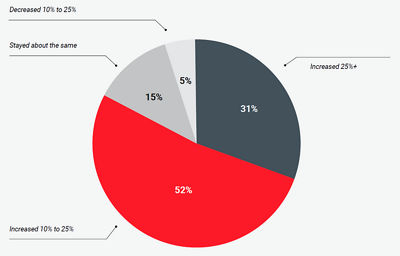
N = 42 Legal Respondents in the United States.
Source: Office Group Printing and Scanning Survey; Keypoint Intelligence 2025
Improving scanning is about more than producing high-quality images. Law firms can benefit from workflows that automatically classify documents, populate metadata, assign matter numbers, and route files directly into approved repositories with minimal intervention. Fewer manual decisions during document capture result in more consistent information..
Shared Devices Require Individual Accountability
Legal work is inherently collaborative. Partners, associates, paralegals, legal assistants, records personnel, and support teams routinely contribute to the same cases. Shared multifunctional devices naturally support this collaboration by providing centralized access to printing, scanning, and copying. Modern authentication technologies enable firms to associate document activity with individual users regardless of physical device.
This accountability is designed to help ensure that confidential documents remain accessible to authorized personnel through secure release printing, and it provides audit records that can be helpful during internal reviews or client inquiries. Perhaps most importantly, though, it encourages greater awareness about document handling because users understand that sensitive activities are not anonymous. This means that confidential information can more reliably be traced through legitimate business processes when necessary.
Client Expectations Are Evolving
More and more legal departments are evaluating outside counsel using detailed security questionnaires. While much attention is given to cybersecurity, clients are also very concerned about the operational controls that surround confidential information. They want to know how physical documents are protected, who can access sensitive jobs, and how devices are retired when leases expire.
These concerns reflect a recognition that information security involves more than servers and cloud platforms. Demonstrating mature document security practices can strengthen a firm’s competitive positioning during outside counsel selection. Clients don’t care if a failure is caused by digital or physical means; they expect their information to remain well-protected regardless of format.
Technology Upgrades Create Valuable Opportunities
Printer replacements are often based on hardware specifications, operating costs, and service agreements. These considerations remain important, but regular equipment refresh cycles can help modernize workflows. Instead of viewing refresh events as basic hardware replacements, they should be seen as opportunities to modernize workflow and/or security. Keypoint Intelligence®’s research finds that there’s room for improvement, however. Less than a quarter of legal respondents were refreshing their scanners when new technology offered significant benefits. Meanwhile, 12% waited for equipment failure and another 5% had no refresh strategy at all.
Figure 2: Scanner Refresh Cycles
How does your organization plan its hardware refersh cycle for scanning devices?
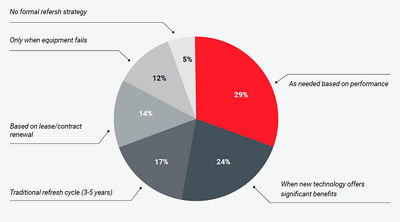
N = 42 Legal Respondents in the United States.
Source: Office Group Printing and Scanning Survey; Keypoint Intelligence 2025
By replacing aging devices with a goal of workflow modernization, law firms have the opportunity to reconsider authentication methods, retire outdated scanning destinations, simplify user interfaces, integrate with identity management systems, and eliminate unnecessary legacy processes.
Migrating existing configurations directly onto new hardware preserves familiar workflows, but it also propagates any long-standing inefficiencies. A better, more valuable approach is to assess operational objectives before new devices are deployed. Start by determining the following:
- What information requires the strongest protection?
- Which workflows consume the greatest administrative effort?
- Are there any areas where users consistently create workarounds?
Armed with this information, firms can make the right investments and achieve greater workflow modernization.
Governance Requires Ongoing Attention
Just like other businesses, law firms are always evolving. Attorneys will join and leave the firm, practice groups will expand into new areas, clients will introduce new security requirements, regulations will change, and documents will move differently between physical and digital environments.
Printing and scanning environments must adapt to keep up with these changes. Permissions that made sense several years ago may now provide wider access than necessary, and default scanning destinations may no longer reflect current document management practices. As attorneys divide their time between offices, courtrooms, client locations, and remote workspaces, legacy authentication policies may need to be adjusted. Periodic reviews help ensure that operational practices remain aligned with modern business realities.
Building Security Around the Way Lawyers Work
Technology will only succeed when it supports the way legal professionals actually work. Understandably, security controls that slow client service or introduce extra administrative effort won’t be met with enthusiasm. On the other hand, thoughtfully designed workflows that simultaneously improve security and productivity are more likely to be embraced. Specifically:

Automated document routing is designed to help reduce filing errors and save time.
Secure release printing helps protect confidentiality and can reduce abandoned print jobs.

Integrated authentication helps simplify access and strengthen accountability.

In addition to making documents easier to find later, consistent scanning workflows help improve information governance.
When implemented correctly, security and efficiency don’t have to be competing priorities. Instead, each reinforces the other.
Looking Beyond the Device
As law firms continue strengthening their overall security, printers and scanners should be viewed differently than they were a decade ago. They are no longer peripheral office devices that support isolated administrative tasks, but integral components of how legal information is created, shared, reviewed, and preserved.
Businesses that integrate their printing and scanning equipment into their overall governance strategy will be better positioned to reduce operational risk without disrupting the pace of work. These devices can improve how documents move through the firm, help detect and prevent security breaches, and reinforce consistent and defensible processes.
By shifting their perspective, law firms can create document handling practices that are resilient, auditable, and adaptable. These qualities will only become more crucial as legal services evolve alongside client expectations, regulatory requirements, and the growing complexity of managing confidential information.
Securing the physical-to-digital document bridge requires an enterprise-grade ecosystem—combining hardened device firmware, encrypted capture routing, and zero-trust print management—an operational standard where Canon’s legal technology solutions enable law firms to satisfy stringent client security mandates without slowing the pace of practice.

CONTACT A CANON SALES REPRESENTATIVE